| Programmer's Guide to the Pro*Ada Precompiler |  Library |
 Product |
 Contents |
 Index |
| Programmer's Guide to the Pro*Ada Precompiler | Library |
Product |
Contents |
Index |


Brief descriptions of the Oracle internal datatypes follow. For more information, see the Oracle7 Server SQL Language Reference Manual.
column_name VARCHAR2(maximum_width)
where maximum_width is an integer literal in the range 1 .. 2000.
Specify the maximum width of a VARCHAR2(n) column in bytes, not characters. If a VARCHAR2(n) column stores multi-byte characters, its maximum width is less than n characters.
The maximum precision of a NUMBER value is 38. The magnitude range is 1.0E-129 to 9.99E125. Scale can range from -84 to 127. For example, a scale of -3 means the number is rounded to the nearest thousand (3456 becomes 3000). A scale of 2 means the value is rounded to the nearest hundredth (3.456 becomes 3.46).
When you specify precision and scale, Oracle does extra integrity checks before storing the data. If you do not specify precision and scale, they default to 38 and 10, respectively.
Note: You can use LONG columns in UPDATE, INSERT, and (most) SELECT statements, but not in expressions, function calls, or certain SQL clauses such as WHERE, GROUP BY, and CONNECT BY. Only one LONG column is currently allowed per database table, and that column cannot be indexed.
RAW data is like VARCHAR2 data, except that Oracle assumes nothing about the meaning of RAW data and does no character set conversions (ASCII to EBCDIC for example) when you transmit RAW data from one system to another.
LONG RAW data is like LONG data, except that Oracle assumes nothing about the meaning of LONG RAW data and does no character set conversions when you transmit LONG RAW data from one system to another.
Note: The restrictions that apply to LONG data also apply to LONG RAW data.
You can use the MLSLABEL datatype to define a column. However, with standard Oracle, such columns can store nulls only. With Trusted Oracle7, you can insert any valid operating system label into a column of type MLSLABEL. If the label is in text format, Trusted Oracle7 converts it to a binary value to reduce the length.
| Pseudocolumn | Corresponding Internal Datatype |
| NEXTVAL | NUMBER |
| CURRVAL | NUMBER |
| ROWNUM | NUMBER |
| LEVEL | NUMBER |
| ROWID | ROWID |
| ROWLABEL | MLSLABEL |
| Function | Corresponding Internal Datatype |
| USER | VARCHAR2 |
| UID | NUMBER |
| SYSDATE | DATE |
EXEC SQL SELECT MONTHS_BETWEEN(SYSDATE, HIREDATE)
INTO :MONTHS_OF_SERVICE
FROM emp
WHERE EMPNO = :EMP_NUMBER;
Brief descriptions of the SQL pseudocolumns and functions follow. For more detailed information, see the Oracle7 Server SQL Language Reference Manual.
NEXTVAL returns the next number in a specified sequence. After creating a sequence, you can use it to generate unique sequence numbers for transaction processing. In the following example, you use the sequence named partno to assign part numbers:
EXEC SQL INSERT INTO PARTS
VALUES (partno.NEXTVAL, :DESCRIPTION, :QUANTITY, :PRICE);
If a transaction generates a sequence number, the sequence is incremented immediately. A reference to NEXTVAL stores the current sequence number in CURRVAL.
CURRVAL returns the current number in a specified sequence. Before you reference CURRVAL, you must use NEXTVAL to generate a sequence number.
ROWNUM returns a number indicating the sequence in which a row was selected from a table. The first row selected has a ROWNUM of 1, the second row has a ROWNUM of 2, and so on. If a SELECT statement includes an ORDER BY clause, ROWNUMs are assigned to the selected rows before the sort is done.
You can use ROWNUM to limit the number of rows returned by a SELECT statement. Also, you can use ROWNUM in an UPDATE statement to assign unique values to each row in a table. Using ROWNUM in the WHERE clause does not stop the processing of a SELECT statement. It just limits the number of rows retrieved. The only meaningful use of ROWNUM in a WHERE clause is
... WHERE ROWNUM < constant;
because the value of ROWNUM increases only when a row is retrieved. The following search condition can never be met because the first four rows are not retrieved:
... WHERE ROWNUM = 5;
LEVEL returns the level number of a node in a tree structure. The root is level 1, children of the root are level 2, grandchildren are level 3, and so on.
LEVEL is used in the SELECT CONNECT BY statement to incorporate some or all the rows of a table into a tree structure. In an ORDER BY or GROUP BY clause, LEVEL segregates the data at each level in the tree.
Specify the direction in which the query walks the tree (down from the root or up from the branches) with the CONNECT BY operator. In the START WITH clause, specify a condition that identifies the root of the tree. See the Oracle7 Server SQL Reference manual for examples of the LEVEL and ORDER BY clauses.
ROWID returns a row address in hexadecimal.
ROWLABEL with standard Oracle returns a null. With Trusted Oracle7, ROWLABEL returns the operating system label for a row in the format specified by the Oracle initialization parameter MLS_LABEL_FORMAT.
A common use of ROWLABEL is to filter query results. For example, the following statement counts only those rows with a security level higher than unclassified:
EXEC SQL SELECT COUNT(*) INTO :HEAD_COUNT FROM emp
WHERE ROWLABEL > 'UNCLASSIFIED';
For more information, see the Trusted Oracle7 Server Administrator's Guide.
USER returns the username of the current Oracle user.
UID returns the unique ID number assigned to an Oracle user.
SYSDATE returns the current date and time.
On Input Oracle reads the number of bytes specified for the input host variable, strips any trailing blanks, then stores the input value in the target database column. Be careful. An uninitialized host variable can contain null characters. So, always blank-pad a character-input host variable to its declared length.
If the input value is longer than the defined width of the database column, Oracle generates an error. If the input value is all-blank, Oracle treats it like a null.
Oracle can convert a character value to a NUMBER column value if the character value represents a valid number. Otherwise, Oracle generates an error.
On Output Oracle returns the number of bytes specified for the output host variable, blank-padding if necessary. Then Oracle assigns the output value to the target host variable. If a null value is returned, Oracle fills the host variable with blanks.
If the output value is longer than the declared length of the host variable, Oracle truncates the value before assigning it to the host variable. If an indicator variable is available, Oracle sets it to the original length of the output value.
Oracle can convert NUMBER column values to character values. The length of the character host variable determines precision. If the host variable is too short for the number, scientific notation is used. For example, if you SELECT the column value 123456789 into a string(1..6), Oracle returns the value "1.2E08."
NUMBER values are stored in variable-length format, starting with an exponent byte and followed by up to 20 mantissa bytes. The high-order bit of the exponent byte is a sign bit that is set for positive numbers. The low-order 7 bits represent the exponent, a base-100 digit with an offset of 65.
Each mantissa byte is a base-100 digit in the range 1 .. 100. For positive numbers, 1 is added to the digit. For negative numbers, the digit is subtracted from 101, and, unless there are 20 mantissa bytes, a byte containing 102 is appended to the data bytes. Each mantissa byte can represent two decimal digits. The mantissa is normalized, and leading zeros are not stored. You can use up to 20 data bytes for the mantissa, but only 19 are guaranteed to be accurate. The 19 bytes, each representing a base-100 digit, allow a maximum precision of 38 digits for a value of the NUMBER datatype.
On output, the host variable contains the number as represented internally by Oracle. To accommodate the largest possible number, the output host variable must be 21 bytes long. Only the bytes used to represent the number are returned. Oracle does not blank-pad or null-terminate the output value for the NUMBER datatype. If you need to know the length of the returned value, use the VARNUM datatype instead.
Note: Normally, there is little reason to use this datatype.
Oracle represents numbers with greater precision than floating point implementations because the internal format of Oracle numbers is decimal.
This external datatype is used mostly in Pro*C; it is seldom needed in a Pro*Ada program.
On input, you must set the first byte of the host variable to the length of the value. On output, the host variable contains the length followed by the number as represented internally by Oracle. To accommodate the largest possible number, the host variable must be 22 bytes long. After SELECTing a column value into a VARNUM host variable, you can check the first byte to get the length of the value.
Normally, there is little reason to use this datatype.
Additional Information: Consult your platform-specific Oracle documentation for more information on the field size of the ROWID.
You can use VARCHAR2-compatible string host variables to store rowids in a readable format. When you SELECT or FETCH a rowid into a string host variable, Oracle converts the binary value to an 18-byte character string and returns it in the format
BBBBBBBB.RRRR.FFFF
where BBBBBBBB is the block in the database file, RRRR is the row in the block (the first row is 0), and FFFF is the database file. These numbers are hexadecimal. For example, the rowid
0000000E.000A.0007
points to the 11th row in the 15th block in the 7th database file.
Typically, you FETCH a rowid into an Ada host variable, then compare the host variable to the ROWID pseudocolumn in the WHERE clause of an UPDATE or DELETE statement. That way, you can identify the latest row fetched by a cursor. For an example, see "Mimicking CURRENT OF" ![[*]](jump.gif) .
.
Note: If you need full portability or your application communicates with a non-Oracle database via SQL*Connect, specify a maximum length of 2000 (not 18) bytes when declaring the host variable. If your application communicates with a non-Oracle database via Oracle Open Gateway, specify a maximum length of 256 bytes. Although you can assume nothing about its contents, the host variable will behave normally in SQL statements.
| Byte | 1 | 2 | 3 | 4 | 5 | 6 | 7 |
| Meaning | Century | Year | Month | Day | Hour | Minute | Second |
| Example 06-DEC-1990 | 119 | 190 | 12 | 6 | 1 | 1 | 1 |
Normally, there is little reason to use this datatype.
When you specify the length of a VARRAW variable, be sure to include 2 bytes for the length field. The first two bytes of the variable must be interpretable as an integer. To get the length of a VARRAW variable, simply refer to its length field.
RAW data is like CHAR data, except that Oracle assumes nothing about the meaning of RAW data and does no character set conversions when you transmit RAW data from one system to another.
LONG RAW data is like LONG data, except that Oracle assumes nothing about the meaning of LONG RAW data and does no character set conversions when you transmit LONG RAW data from one system to another.
On Input Oracle reads the number of bytes specified for the input host variable, does not strip trailing blanks, then stores the input value in the target database column.
If the input value is longer than the defined width of the database column, Oracle generates an error. If the input value is all-blank, Oracle treats it like a character value.
On Output Oracle returns the number of bytes specified for the output host variable, blank-padding if necessary, then assigns the output value to the target host variable. If a null is returned, Oracle fills the host variable with blanks.
If the output value is longer than the declared length of the host variable, Oracle truncates the value before assigning it to the host variable. If an indicator variable is available, Oracle sets it to the original length of the output value.
You can use the MLSLABEL datatype to define a column. However, with standard Oracle, such columns can store nulls only. With Trusted Oracle, you can insert any valid operating system label into a column of type MLSLABEL.
On Input Trusted Oracle7 translates the input value into a binary label, which must be a valid operating system label. If it is not, Trusted Oracle7 issues an error message. If the label is valid, Trusted Oracle7 stores it in the target database column.
On Output Trusted Oracle7 converts the binary label to a character string, which can be of type CHAR, CHARZ, STRING, VARCHAR, or VARCHAR2.
On Input When MODE=ANSI, if both values being compared in a SQL statement belong to type CHAR, blank-padding semantics are used. That is, before comparing character values of unequal length, Oracle blank-pads the shorter value to the length of the longer value. For example, if ENAME is a CHAR database column and EMP_NAME is a CHAR host variable (by default or via datatype equivalencing), the following search condition is TRUE when the column value "BELL" and the host value "BELL " are compared:
... WHERE ENAME = :EMP_NAME;
When MODE=ORACLE, if either or both values in a comparison belong to type VARCHAR2, non-blank-padding semantics are used. That is, when comparing character values of unequal length, Oracle makes no adjustments and uses the exact lengths. For example, if JOB is a CHAR column and JOB_TITLE is a VARCHAR2 host variable, the following search condition is FALSE when the column value "CLERK" and the host value "CLERK " are compared:
... WHERE JOB = :JOB_TITLE;
When you INSERT a character value into a CHAR database column, if the value is shorter than the defined width of the column, Oracle blank-pads the value to the defined width. As a result, information about trailing blanks is lost. If the character value is longer than the defined width of the CHAR column, Oracle generates an error. Oracle neither truncates the value nor tries to trim trailing blanks.
When you INSERT a character value into a VARCHAR2 database column, if the value is shorter than the defined width of the column, Oracle does not blank-pad the value. Nor does Oracle strip trailing blanks. Character values are stored intact, so no information is lost. If the character value is longer than the defined width of the VARCHAR2 column, Oracle generates an error. Oracle neither truncates the value nor tries to trim trailing blanks. The same rules apply when UPDATEing.
On Output When you SELECT a column value into a CHAR host variable, if the value is shorter than the declared length of the variable, Oracle blank-pads the value to the declared length. For example, if EMP_NAME is a CHAR(15) host variable (by default or via datatype equivalencing), and you SELECT a 10-byte column value into it, Oracle adds 5 blanks. If the column value is longer than the declared length of the CHAR host variable, Oracle truncates the value, stores it, and generates a warning.
When you SELECT a column value into a VARCHAR2 host variable, if the value is shorter than the declared length of the variable, Oracle does not blank-pad the value. Nor does Oracle strip trailing blanks. If the column value is longer than the declared length of the VARCHAR2 host variable, Oracle truncates the value, stores it, and generates a warning. The same rules apply when FETCHing.
If you precompile your program with the option MODE=ORACLE, you can declare and use host variables of the types described in this section. If you precompile your program with MODE=ANSI, you must use the datatypes defined in the supplied SQL_STANDARD package. For more information, see "The SQL_STANDARD Package" . For more information about the command line options such as MODE, see Chapter 11, "Running the Pro*Ada Precompiler."
A host variable can be any valid usage of a simple variable, a function call, an array slice, a selected record component, or a qualified reference to a variable in another package. The datatype of the host variable must be:
Pro*Ada does not do checking on constrained subtypes or derived types. For example, in the following code fragment the constraint error is caught at runtime, not at precompile time or compile time:
type STYPE is integer range 1..2;
MY_SHORT : STYPE;
...
EXEC SQL SELECT 3 INTO :MY_SHORT FROM dual;
...
Table 3 - 6 lists the Ada base types, followed by the Pro*Ada-defined datatypes that can be used as host variables. If a function call is used as a host variable, it must return one of these types. Only these types can normally be used as host variables. However, for an example that shows how to use derived types, see "Derived Types as Host Variables" .
A host variable and its source or target database column do not need to have similar types. But they must be compatible. Oracle automatically converts between most Oracle and Ada datatypes. For example, if a database column of type NUMBER is SELECTed into a string variable, Oracle does the conversion from the internal binary NUMBER format to the ASCII characters in the Ada string.
Figure 3 - 1 shows how host variable datatypes (in the left-hand column) are compatible with Oracle datatypes (on the top row). A blank box indicates that the datatypes are not compatible. For example, you cannot convert an Ada numeric type to an Oracle date. If you try to convert between incompatible types, an "incompatible datatypes" error occurs at runtime.
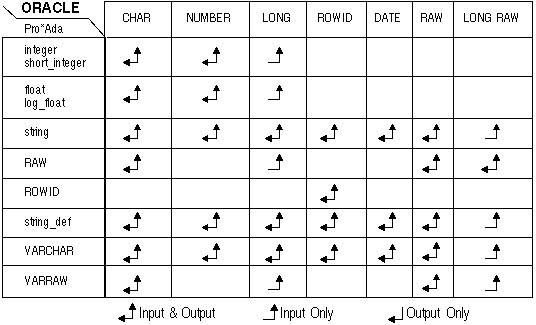 Figure 3 - 1. Possible Datatype Conversion
Data conversion follows normal programming practices. For example, you cannot convert an Oracle NUMBER value that is greater than 2147483647 to an Ada integer (on most systems). If you try this, Oracle will produce a "converting column overflows integer datatype" runtime error. Also, you cannot convert a string host variable that contains characters other than `0'-`9', `E', `e', `.', `,', `+', or `-' to an Oracle NUMBER column.
A SQL Declare Section begins with the statement
EXEC SQL BEGIN DECLARE SECTION;
and ends with the statement
EXEC SQL END DECLARE SECTION;
Between these two statements only the following are allowed:
Pro*Ada defines tightly constrained bindings between the converted Oracle types and host variable types. These bindings cannot be manipulated by the Pro*Ada programmer. Consequently, all of the integrity built into the type checking mechanisms of the Ada language is maintained by the interface between Pro*Ada and Oracle.
Ada declarations of host variables must be consistent with the implied modes of parameters in the SQL statement where they appear. For example, Ada constants cannot be referenced as host output variables.
Most violations in host variable declaration or use are detected and reported at compile time, usually because the Ada compiler cannot resolve an argument in a procedure call generated by the precompiler. These calls are typically to the procedures SQL_BIND, SQL_INTO, and SQL_STORE. These procedures are used explicitly in dynamic SQL Pro*Ada programs. For more information about these procedures, see Chapter 9, "Implementing Dynamic SQL Method 4."
The usual cause of such an error is the use of an unsupported Ada type for a host variable. For more information about Ada types, see "Derived Types as Host Variables" . Certain violations, such as an attempt to perform an array operation using a non-array host variable, are detected only at runtime.
BIN_DATA : ORACLE.RAW(1..255);
Note: A RAW value greater than 255 bytes can only be inserted into a LONG RAW column. The maximum useable length of a RAW is 65535 bytes.
Pro*Ada predefines neither operators nor input/output subprograms for the RAW datatype.
MY_ROWID : string(1..18);
...
EXEC SQL SELECT rowid INTO :MY_ROWID
FROM emp WHERE ename = 'ALLEN';
PUT_LINE("ROWID is " & MY_ROWID); would print something like
ROWID is 000017D8.0001.0002
which in this case means the 6104th block, 2nd row, in the 2nd database file. The actual value printed would differ from case to case.
However, if you use the Pro*Ada-defined ROWID datatype in a query, you receive the ROWID in a system-specific binary format, as shown in the following example:
MY_ROWID : ORACLE.ROWID;
...
EXEC SQL SELECT rowid INTO :MY_ROWID
FROM emp
WHERE ename = 'ALLEN';
PUT("Size of binary ROWID is ");
PUT(ORACLE.ROWID'size);
PUT_LINE(" bits."); This example shows that the size of the binary ROWID type is not usually 18 bytes. The size varies from system-to-system. With VAX/VMS Pro*Ada, it is 13 bytes.
Note: Pro*Ada does not predefine any operators or special input/output subprograms for the ROWID datatype.
For an example that uses the binary ROWID datatype, see "Mimicking CURRENT OF" .
EMP_NAME_ACC : ORACLE.STRING_DEF;
...
begin
EMP_NAME_ACC := new string(1..15);
...
EXEC SQL SELECT ename INTO :EMP_NAME_ACC
FROM emp
WHERE empno = 7499;
PUT_LINE(
"The employee who has empno 7499 is " & EMP_NAME_ACC.all);
Note: The .all access indicator is not used with STRING_DEF host variables when they are used in SQL statements.
For input to and output from Oracle, host variables of type STRING_DEF obey the same rules as host variables of type string. For more information, see "Handling Character Data" .
Note: STRING_DEF variables cannot be used to form host arrays.
type VARCHAR (n : integer) is record
length : unsigned_short := 0;
buffer : string(1..n);
end record;
One advantage of VARCHAR is that the length of the string is set by Oracle on output. In the following example, you use a VARCHAR string as a host variable in a query:
with text_io,
integer_text_io,
VARCHAR_TEXT_IO;
...
EMP_NAME : ORACLE.VARCHAR(20); -- max length is 20
...
EXEC SQL SELECT INITCAP(ename) INTO :EMP_NAME
FROM emp
WHERE ename = 'ALLEN';
text_io.PUT("The length of ");
VARCHAR_TEXT_IO.PUT(EMP_NAME);
text_io.PUT("'s name is ");
integer_text_io.PUT(integer(EMP_NAME.LENGTH), 2);
text_io.NEW_LINE;
and the program prints "The length of Allen's name is 5."
When you use a VARCHAR variable for input to Oracle, you must set the length component before performing the INSERT or UPDATE statement.
NAME : ORACLE.VARCHAR(5);
...
NAME := "SMITH";
When you assign character data to the buffer component of a VARCHAR, you must also set the length component. For example:
NAME : ORACLE.VARCHAR(10);
...
NAME.BUFFER(1..5) := "SMITH";
NAME.LENGTH := 5;
It is possible to copy between VARCHARs of identical maximum length, using the assignment operator. For example, the following code fragment would print "Y is ABCDE":
X : ORACLE.VARCHAR(5);
Y : ORACLE.VARCHAR(5);
...
X.buffer := "ABCDE";
X.length := 5; -- length MUST be set
Y := X;
PUT("Y is ");
VARCHAR_TEXT_IO.PUT(Y);
NEW_LINE;
PUT( V : VARCHAR)
PUT_LINE ( V : VARCHAR)
GET ( V : IN OUT VARCHAR)
GET_LINE ( V : IN OUT VARCHAR)
GET_LINE ( V : IN OUT VARCHAR, LAST : NATURAL)
When the VARCHAR_TEXT_IO package is used with GET, the length component is set by the procedure. If, for the code fragment
with text_io,
integer_text_io,
VARCHAR_TEXT_IO;
...
MY_V_STRING : ORACLE.VARCHAR(80);
...
text_io.PUT("Enter a string: ");
VARCHAR_TEXT_IO.GET_LINE(MY_V_STRING);
text_io.PUT("The length is ");
integer_text_io.PUT(integer(MY_V_STRING.LENGTH),WIDTH => 2);
NEW_LINE;
you enter the string "This is my string", the program will print the line: "The length is 17".
type VARRAW (n : integer) is record
length : unsigned_short := 0;
buffer : raw(1..n);
end record;
VARRAW behaves like VARCHAR with respect to the setting of the buffer and length components. There are no operators or input/output packages predefined for VARRAW, because VARRAW is intended for raw binary data, not character data. You can, of course, create your own input/output packages for VARRAW data.
-- declare host variables
EMP_NUMBER : integer;
EMP_NAME : string(1..10);
DEPT_NUMBER : integer;
...
PUT("Employee number: ");
INTEGER_TEXT_IO.GET(EMP_NUMBER);
...
EXEC SQL SELECT deptno, ename INTO :DEPT_NUMBER, :EMP_NAME
FROM emp
WHERE empno = :EMP_NUMBER;
A host variable must be
You can use ORACLE.INDICATOR or integer as the type for indicator variables. When you precompile with MODE=ANSI, you must use the types defined in the SQL_STANDARD package. The types for indicator variables in that package are INDICATOR_TYPE or SMALLINT.
-- declare host and indicator variables
EMP_NUMBER : integer;
SALARY : float;
COMMISSION : float;
IND_COMM : indicator; -- indicator variable
PAY : float;
...
PUT("Employee number: ");
GET(EMP_NUMBER);
...
EXEC SQL SELECT sal, comm
INTO :SALARY, :COMMISSION :IND_COMM
FROM emp
WHERE empno = :EMP_NUMBER;
...
if IND_COMM = -1 then -- commission is null
PAY := SALARY;
else
PAY := SALARY + COMMISSION;
end if;
...
To improve readability, you can precede any indicator variable with the optional keyword INDICATOR. You must still prefix the indicator variable with a colon. The correct syntax is
:HOST_VARIABLE INDICATOR :INDICATOR_VARIABLE
which is equivalent to
:HOST_VARIABLE :INDICATOR_VARIABLE
You can use both forms of expression in your host program. However, the keyword INDICATOR is not allowed in Ada statements.
Note: When you precompile with MODE=ANSI, you must use the INDICATOR keyword.
For more information about using indicator variables in your program, see "Using Indicator Variables" .
An indicator variable must be:
When inputting data from a VARCHAR variable, only the number of characters specified in the length component is transmitted to the database. For example, in the following code fragment, only the value "BAKER" is transmitted:
NAME : ORACLE.VARCHAR(15);
...
NAME.buffer := "BAKERxxxxxxxxxx";
NAME.length := 5;
EXEC SQL INSERT INTO emp (ename, empno, deptno)
VALUES (:NAME, 9999, 10);
NAME : string(1..15);
JOB : ORACLE.STRING_DEF;
...
NAME := "xxxxxxxxxxxxxxx";
JOB := new string'("xxxxxxxxxxxxxxx");
EXEC SQL SELECT ename, job
INTO :NAME, :JOB
FROM emp
WHERE ename = 'ALLEN';
PUT_LINE("|" & NAME & "|");
PUT_LINE("|" & JOB.all & "|"); would print
|ALLEN |
|SALESMAN |
For VARCHAR variables, the length component is set to the length of the value after the SELECT or FETCH, and the buffer component is set to the output value. Note that values in the buffer component beyond the range specified by the length do not change. So, the code fragment
NAME : ORACLE.VARCHAR(15);
...
NAME.buffer := "xxxxxxxxxxxxxxx";
EXEC SQL SELECT ename INTO :NAME
FROM emp
WHERE ename = 'ALLEN';
PUT(NAME.buffer(1..15) & " length =");
PUT(integer(NAME.length, 2);
would print
ALLENxxxxxxxxxx length = 5
When Oracle NUMBER data is output to string or STRING_DEF variables, the value is right-justified in the variable. For example, the code fragment
SALARY : string(1..10);
...
EXEC SQL SELECT sal INTO :SALARY
FROM emp
WHERE ename = 'ALLEN';
PUT_LINE("Salary is |" & SALARY(1..10) & "|"); prints
Salary is | 1600|
for host variables, you must instantiate a new bind package for the type. The new type must be derived from one of the types that is supported as a host variable type. The generic packages for binds are found in the source files for the Pro*Ada library, which are available with the Pro*Ada distribution set.Additional Information: Consult your platform-specific Oracle documentation for the location of these files.
The following packages contain the specifications for the bind generics:
Note: Because scalar types differ in the way they are passed as parameters on different systems, new bind instantiations can be non-portable.
You must instantiate a new bind package to let the SAL_TYPE type serve for host variables. In this case, instantiate a new scalar binds package from the generic SCALAR_BINDS.
Note, however, that the generic has two functions (ORACLE_TYPE and GET_VALUE) and five procedures (SET_BIND, SET_BIND, SET_BIND, SET_BIND, and SET_VALUE) as parameters. You must provide these subprograms. The easiest way to provide these subprograms in your program, or in a package that you create, is to write them so that they call the Oracle-supplied integer bind subprograms in the package ORACLE.BINDS. This is shown in the following example, which is a complete Pro*Ada program that derives a new integer type, and uses a variable of that type as a host variable in a query. This program is available online in the Pro*Ada demo directory.
-- derive.pad
with text_io,
     integer_text_io,
     SCALAR_BINDS,
     ORACLE_TYPES;

procedure DERIVE is
use text_io,
    integer_text_io;

type SAL_TYPE is new integer range 0..10_000;  -- per month!
USERNAME    :   constant string := "SCOTT";
PASSWORD    :   constant string := "TIGER";
SALARY      :   SAL_TYPE;
SQL_ERROR   :   exception;
NOT_FOUND   :   exception;

    function SAL_TYPE_RETURN_FUNC(RV : SAL_TYPE)
        return ORACLE.UNSIGNED_BYTE is
    begin
        return ORACLE.SQLS_INT;
    end SAL_TYPE_RETURN_FUNC;

    procedure SET_BIND(
        D   : ORACLE.DESCRIPTOR_DEF;
        VN  : INTEGER;
        HV  : SAL_TYPE) is
    begin
        ORACLE.BINDS.SET_BIND(D,VN,integer(HV));
    end SET_BIND;

    procedure SET_BIND(
        D   : ORACLE.DESCRIPTOR_DEF;
        VN  : INTEGER;
        HV  : SAL_TYPE;
        SQM : ORACLE.SQLMODE_TYPE) is
    begin
        ORACLE.BINDS.SET_BIND(D,VN,integer(HV),SQM);
    end SET_BIND;

    procedure SET_BIND(
        D   : ORACLE.DESCRIPTOR_DEF;
        VN  : integer;
        HV  : SAL_TYPE;
        HI  : ORACLE.INDICATOR) is
    begin
        ORACLE.BINDS.SET_BIND(D,VN,integer(HV),HI);
    end SET_BIND;

    procedure SET_BIND(
        D   : ORACLE.DESCRIPTOR_DEF;
        VN  : integer;
        HV  : SAL_TYPE;
        HI  : ORACLE.INDICATOR;
        SQM : ORACLE.SQLMODE_TYPE) is
    begin
        ORACLE.BINDS.SET_BIND(D,VN,integer(HV),HI,SQM);
    end SET_BIND;

-- Note that the following is ambiguous:
--      return(SAL_TYPE(ORACLE.BINDS.GET_VALUE(D,VN)));
-- So, we assign the return value into a temporary variable.
    function GET_VALUE(
        D  : ORACLE.DESCRIPTOR_DEF;
        VN : integer) return SAL_TYPE is
    RESULT : INTEGER := ORACLE.BINDS.GET_VALUE(D,VN);

    begin
        return(SAL_TYPE(RESULT));
    end GET_VALUE;

    procedure SET_VALUE(
        D  : ORACLE.DESCRIPTOR_DEF;
        VN : integer;
        HV : SAL_TYPE) is
    begin
        ORACLE.BINDS.SET_VALUE(D,VN,integer(HV));
    end set_value;
 -- instantiate new type for binds

    package SAL_TYPE_BINDS is new SCALAR_BINDS(
        SAL_TYPE,
        ORACLE.INDICATOR,
        ORACLE.SQLMODE_TYPE,
        SAL_TYPE_RETURN_FUNC,
        SET_BIND,
        SET_BIND,
        SET_BIND,
        SET_BIND,
        GET_VALUE,
        SET_VALUE);
        use SAL_TYPE_BINDS;
 begin
    EXEC SQL WHENEVER SQLERROR raise SQL_ERROR;
    EXEC SQL WHENEVER NOT FOUND raise NOT_FOUND;
    EXEC SQL CONNECT :USERNAME IDENTIFIED BY :PASSWORD;
    EXEC SQL SELECT sal INTO :SALARY
        FROM emp
        WHERE ename = 'ALLEN';
    PUT("Allen's salary is ");
    PUT(integer(SALARY));
    NEW_LINE;
    EXEC SQL COMMIT RELEASE;

exception
-- the following is a declarative SQL statement
-- it is not executable in the Ada code sense
-- it turns off error checking for the ROLLBACKs
    EXEC SQL WHENEVER SQLERROR CONTINUE;

    when SQL_ERROR =>
        PUT_LINE(" ** ORACLE ERROR OCCURRED **");
        NEW_LINE;
        PUT_LINE(ORACLE.ERROR.MESSAGE);
        EXEC SQL ROLLBACK RELEASE;

    when constraint_error =>
        PUT("Allen is paid too much. Reduce his salary.");
        NEW_LINE;
        EXEC SQL ROLLBACK RELEASE;

    when NOT_FOUND =>
        PUT("Allen not found in EMP table.");
        NEW_LINE;
        EXEC SQL ROLLBACK RELEASE;
 end DERIVE;
package SQL_STANDARD is
  package CHARACTER_SET renames STANDARD;
  subtype CHARACTER_TYPE is CHARACTER_SET.CHARACTER;
  type CHAR is array (POSITIVE range <>) of CHARACTER_TYPE;
  type BIT is array (NATURAL range <>) of BOOLEAN;
  type SMALLINT is range -2**15..2**15-1;     -- = osd.short_integer;
  type INT is range -2**31..2**31-1;          -- = osd.integer;
  type REAL is digits 6;                      -- = VAX's F_float
  type DOUBLE_PRECISION is digits 9;          -- = VAX's D_float, not G_float
  type SQLCODE_TYPE is range -2**31..2**31-1; -- = osd.integer;
  type SQLSTATE_TYPE is new CHAR(1..5);
  subtype SQL_ERROR is SQLCODE_TYPE range SQLCODE_TYPE'FIRST..-1;
  subtype NOT_FOUND is SQLCODE_TYPE range 100..100;
  subtype INDICATOR_TYPE is SMALLINT;

  package SQLSTATE_CODES is
    AMBIGUOUS_CURSOR_NAME_NO_SUBCLASS:
      constant SQLSTATE_TYPE := "3C000";
    CARDINALITY_VIOLATION_NO_SUBCLASS:
      constant SQLSTATE_TYPE := "21000";
    CONNECTION_EXCEPTION_NO_SUBCLASS:
      constant SQLSTATE_TYPE := "08000";
    CONNECTION_EXCEPTION_CONNECTION_DOES_NOT_EXIST:
      constant SQLSTATE_TYPE := "08003";
    CONNECTION_EXCEPTION_CONNECTION_FAILURE:
      constant SQLSTATE_TYPE := "08006";
    CONNECTION_EXCEPTION_CONNECTION_NAME_IN_USE:
      constant SQLSTATE_TYPE := "08002";
    CONNECTION_EXCEPTION_SQLCLIENT_UNABLE_TO_ESTABLISH_SQLCONNECTION:
      constant SQLSTATE_TYPE := "08001";
    CONNECTION_EXCEPTION_SQLSERVER_REJECTED_ESTABLISHMENT_OF_SQLCONNECTION:
      constant SQLSTATE_TYPE := "08004";
    CONNECTION_EXCEPTION_TRANSACTION_RESOLUTION_UNKNOWN:
      constant SQLSTATE_TYPE := "08007";
    DATA_EXCEPTION_NO_SUBCLASS:
      constant SQLSTATE_TYPE := "22000";
    DATA_EXCEPTION_CHARACTER_NOT_IN_REPERTOIRE:
      constant SQLSTATE_TYPE := "22021";
    DATA_EXCEPTION_DATETIME_FIELD_OVERFLOW:
      constant SQLSTATE_TYPE := "22008";
    DATA_EXCEPTION_DIVISION_BY_ZERO:
      constant SQLSTATE_TYPE := "22012";
    DATA_EXCEPTION_ERROR_IN_ASSIGNMENT:
      constant SQLSTATE_TYPE := "22005";
    DATA_EXCEPTION_INDICATOR_OVERFLOW:
      constant SQLSTATE_TYPE := "22022";
    DATA_EXCEPTION_INTERVAL_FIELD_OVERFLOW:
      constant SQLSTATE_TYPE := "22015";
    DATA_EXCEPTION_INVALID_CHARACTER_VALUE_FOR_CAST:
      constant SQLSTATE_TYPE := "22018";
    DATA_EXCEPTION_INVALID_DATETIME_FORMAT:
      constant SQLSTATE_TYPE := "22007";
    DATA_EXCEPTION_INVALID_ESCAPE_CHARACTER:
      constant SQLSTATE_TYPE := "22019";
    DATA_EXCEPTION_INVALID_ESCAPE_SEQUENCE:
      constant SQLSTATE_TYPE := "22025";
    DATA_EXCEPTION_INVALID_PARAMETER_VALUE:
      constant SQLSTATE_TYPE := "22023";
    DATA_EXCEPTION_INVALID_TIME_ZONE_DISPLACEMENT_VALUE:
      constant SQLSTATE_TYPE := "22009";
    DATA_EXCEPTION_NULL_VALUE_NO_INDICATOR_PARAMETER:
      constant SQLSTATE_TYPE := "22002";
    DATA_EXCEPTION_NUMERIC_VALUE_OUT_OF_RANGE:
      constant SQLSTATE_TYPE := "22003";
    DATA_EXCEPTION_STRING_DATA_LENGTH_MISMATCH:
      constant SQLSTATE_TYPE := "22026";
    DATA_EXCEPTION_STRING_DATA_RIGHT_TRUNCATION:
      constant SQLSTATE_TYPE := "22001";
    DATA_EXCEPTION_SUBSTRING_ERROR:
      constant SQLSTATE_TYPE := "22011";
    DATA_EXCEPTION_TRIM_ERROR:
      constant SQLSTATE_TYPE := "22027";
    DATA_EXCEPTION_UNTERMINATED_C_STRING:
      constant SQLSTATE_TYPE := "22024";
    DEPENDENT_PRIVILEGE_DESCRIPTORS_STILL_EXIST_NO_SUBCLASS:
      constant SQLSTATE_TYPE := "2B000";
    DYNAMIC_SQL_ERROR_NO_SUBCLASS:
      constant SQLSTATE_TYPE := "07000";
    DYNAMIC_SQL_ERROR_CURSOR_SPECIFICATION_CANNOT_BE_EXECUTED:
      constant SQLSTATE_TYPE := "07003";
    DYNAMIC_SQL_ERROR_INVALID_DESCRIPTOR_COUNT:
      constant SQLSTATE_TYPE := "07008";
    DYNAMIC_SQL_ERROR_INVALID_DESCRIPTOR_INDEX:
      constant SQLSTATE_TYPE := "07009";
    DYNAMIC_SQL_ERROR_PREPARED_STATEMENT_NOT_A_CURSOR_SPECIFICATION:
      constant SQLSTATE_TYPE := "07005";
    DYNAMIC_SQL_ERROR_RESTRICTED_DATA_TYPE_ATTRIBUTE_VIOLATION:
      constant SQLSTATE_TYPE := "07006";
    DYNAMIC_SQL_ERROR_USING_CLAUSE_DOES_NOT_MATCH_DYNAMIC_PARAMETER_SPEC:
      constant SQLSTATE_TYPE := "07001";
    DYNAMIC_SQL_ERROR_USING_CLAUSE_DOES_NOT_MATCH_TARGET_SPEC:
      constant SQLSTATE_TYPE := "07002";
    DYNAMIC_SQL_ERROR_USING_CLAUSE_REQUIRED_FOR_DYNAMIC_PARAMETERS:
      constant SQLSTATE_TYPE := "07004";
    DYNAMIC_SQL_ERROR_USING_CLAUSE_REQUIRED_FOR_RESULT_FIELDS:
      constant SQLSTATE_TYPE := "07007";
    FEATURE_NOT_SUPPORTED_NO_SUBCLASS:
      constant SQLSTATE_TYPE := "0A000";
    FEATURE_NOT_SUPPORTED_MULTIPLE_ENVIRONMENT_TRANSACTIONS:
      constant SQLSTATE_TYPE := "0A001";
    INTEGRITY_CONSTRAINT_VIOLATION_NO_SUBCLASS:
      constant SQLSTATE_TYPE := "23000";
    INVALID_AUTHORIZATION_SPECIFICATION_NO_SUBCLASS:
      constant SQLSTATE_TYPE := "28000";
    INVALID_CATALOG_NAME_NO_SUBCLASS:
      constant SQLSTATE_TYPE := "3D000";
    INVALID_CHARACTER_SET_NAME_NO_SUBCLASS:
      constant SQLSTATE_TYPE := "2C000";
    INVALID_CONDITION_NUMBER_NO_SUBCLASS:
      constant SQLSTATE_TYPE := "35000";
    INVALID_CONNECTION_NAME_NO_SUBCLASS:
      constant SQLSTATE_TYPE := "2E000";
    INVALID_CURSOR_NAME_NO_SUBCLASS:
      constant SQLSTATE_TYPE := "34000";
    INVALID_CURSOR_STATE_NO_SUBCLASS:
      constant SQLSTATE_TYPE := "24000";
    INVALID_SCHEMA_NAME_NO_SUBCLASS:
      constant SQLSTATE_TYPE := "3F000";
    INVALID_SQL_DESCRIPTOR_NAME_NO_SUBCLASS:
      constant SQLSTATE_TYPE := "33000";
    INVALID_SQL_STATEMENT_NAME_NO_SUBCLASS:
      constant SQLSTATE_TYPE := "26000";
    INVALID_TRANSACTION_STATE_NO_SUBCLASS:
      constant SQLSTATE_TYPE := "25000";
    INVALID_TRANSACTION_TERMINATION_NO_SUBCLASS:
      constant SQLSTATE_TYPE := "2D000";
    NO_DATA_NO_SUBCLASS:
      constant SQLSTATE_TYPE := "02000";
    REMOTE_DATABASE_ACCESS_NO_SUBCLASS:
      constant SQLSTATE_TYPE := "HZ000";
    SUCCESSFUL_COMPLETION_NO_SUBCLASS:
      constant SQLSTATE_TYPE := "00000";
    SYNTAX_ERROR_OR_ACCESS_RULE_VIOLATION_NO_SUBCLASS:
      constant SQLSTATE_TYPE := "42000";
    SYNTAX_ERROR_OR_ACCESS_RULE_VIOLATION_IN_DIRECT_STATEMENT_NO_SUBCLASS:
      constant SQLSTATE_TYPE := "2A000";
    SYNTAX_ERROR_OR_ACCESS_RULE_VIOLATION_IN_DYNAMIC_STATEMENT_NO_SUBCLASS:
      constant SQLSTATE_TYPE := "37000";
    TRANSACTION_ROLLBACK_NO_SUBCLASS:
      constant SQLSTATE_TYPE := "40000";
    TRANSACTION_ROLLBACK_INTEGRITY_CONSTRAINT_VIOLATION:
      constant SQLSTATE_TYPE := "40002";
    TRANSACTION_ROLLBACK_SERIALIZATION_FAILURE:
      constant SQLSTATE_TYPE := "40001";
    TRANSACTION_ROLLBACK_STATEMENT_COMPLETION_UNKNOWN:
      constant SQLSTATE_TYPE := "40003";
    TRIGGERED_DATA_CHANGE_VIOLATION_NO_SUBCLASS:
      constant SQLSTATE_TYPE := "27000";
    WARNING_NO_SUBCLASS:
      constant SQLSTATE_TYPE := "01000";
    WARNING_CURSOR_OPERATION_CONFLICT:
      constant SQLSTATE_TYPE := "01001";
    WARNING_DISCONNECT_ERROR:
      constant SQLSTATE_TYPE := "01002";
    WARNING_IMPLICIT_ZERO_BIT_PADDING:
      constant SQLSTATE_TYPE := "01008";
    WARNING_INSUFFICIENT_ITEM_DESCRIPTOR_AREAS:
      constant SQLSTATE_TYPE := "01005";
    WARNING_NULL_VALUE_ELIMINATED_IN_SET_FUNCTION:
      constant SQLSTATE_TYPE := "01003";
    WARNING_PRIVILEGE_NOT_GRANTED:
      constant SQLSTATE_TYPE := "01007";
    WARNING_PRIVILEGE_NOT_REVOKED:
      constant SQLSTATE_TYPE := "01006";
    WARNING_QUERY_EXPRESSION_TOO_LONG_FOR_INFORMATION_SCHEMA:
      constant SQLSTATE_TYPE := "0100A";
    WARNING_SEARCH_CONDITION_TOO_LONG_FOR_INFORMATION_SCHEMA:
      constant SQLSTATE_TYPE := "01009";
    WARNING_STRING_DATA_RIGHT_TRUNCATION_WARNING:
      constant SQLSTATE_TYPE := "01004";
    WITH_CHECK_OPTION_VIOLATION_NO_SUBCLASS:
      constant SQLSTATE_TYPE := "44000";
  end sqlstate_codes;
end SQL_STANDARD;
The appropriate SQL_STANDARD package for your system is supplied with your version of Pro*Ada.
Pro*Ada does not support subunits, using the separate clause. This means the separately-compiled subunits cannot contain embedded SQL statements. You can, of course, use subunits that contain no embedded SQL.
Note: Tasking is not available on all platforms. Check your Oracle system-specific documentation for information.
To enable tasking in your program, you must enable multi-threading. Do this by coding the statement
EXEC SQL ENABLE THREADS
in your main Pro*Ada program, before any calls are made to subprograms that use tasking. When you precompile your Pro*Ada sources, you also must use the command-line option THREADS, specifying the value YES. For example
proada my_file ... THREADS=YES
See page 11 - 18 for more information about the THREADS command-line option.
The following guidelines must be followed by a Pro*Ada application that uses tasking:
| ORACLE Package Function | SQLCA Variable |
| ORACLE.SQLROWS | SQLCA.SQLERRD(3) |
| ORACLE.SQLCODE | SQLCA.SQLCODE |
| ORACLE.ERROR.MESSAGE | SQLCA.SQLERRMC |
.
for more information.task_drv.pad
A very short Pro*Ada driver program that starts the tasking demonstration.
tasks.a
Contains an Ada package, MY_TASK_DRIVER, that calls subprograms in two separate tasks.
task_a.pad
Pro*Ada code that implements the first task.
task_b.pad
Pro*Ada code that implements the second task.
These files are available on-line in the precompiler demo directory.
-- This short program is used to start the tasking demonstration
-- programs.

-- This Pro*Ada program must be precompiled using the command-line
-- option specification THREADS=YES

with
  MY_TASK_DRIVER,
  TEXT_IO;

procedure TASK_DRV is

begin
  EXEC SQL ENABLE THREADS;
  text_io.put_line("Enabled for tasking");
  MY_TASK_DRIVER.STARTEM;
end TASK_DRV;
with
    TASK_A,
    TASK_B,
    TEXT_IO;

package MY_TASK_DRIVER is

  procedure STARTEM;

end MY_TASK_DRIVER;
package body MY_TASK_DRIVER is

CHOICE               : string(1..5);
CHOICE_LENGTH        : integer;
CURSOR_ID            : string(1..4);
CURSOR_ID_LENGTH     : integer;
COURSE_NAME          : string(1..20);
COURSE_NAME_LENGTH   : integer;
STUDENT_ID           : string(1..20);
STUDENT_ID_LENGTH    : integer;
SOCIAL_SEC_NO        : string(1..20);
SOCIAL_SEC_NO_LENGTH : integer;

procedure startem is
  task TASK1 is
    entry UPDATE_STUDENT_RECORDS (ID : in string; SOCIAL_SEC_NO : in string);
    entry SHUT_DOWN;
  end TASK1;

  task TASK2 is
    entry UPDATE_CLASS_RECORDS
         (ID : in string; COURSE_NAME : in string);
    entry SHUT_DOWN;
  end TASK2;

  task body TASK1 is
  RET : boolean;
  begin
    TASK_A.ORA_CONNECT;
    TASK1_LOOP:
    loop
      select
      accept UPDATE_STUDENT_RECORDS
          (ID : in string; SOCIAL_SEC_NO : in string)
      do
    -- Either update existing or add new student record
        RET := TASK_A.ORA_QUERY(ID);
        if RET then
          text_io.put_line("Updating record.");
          TASK_A.ORA_UPDATE(ID, SOCIAL_SEC_NO);
        else
          text_io.put_line("Inserting a record.");
          TASK_A.ORA_INSERT(ID, SOCIAL_SEC_NO);
        end if;
        TASK_A.ORA_COMMIT;
      end UPDATE_STUDENT_RECORDS;
      or
      accept SHUT_DOWN do
        TASK_A.ORA_LOGOFF;
      end;
      or
        terminate;
      end select;
    end loop TASK1_LOOP;
  end TASK1;

  task body TASK2 is
  RET : boolean;
  begin
    TASK_B.ORA_CONNECT;
    TASK2_LOOP:
    loop
      select
      accept UPDATE_CLASS_RECORDS
          (ID : in string; COURSE_NAME : in string)
      do
        RET := TASK_B.ORA_QUERY(ID);
        if RET then
          TASK_B.ORA_UPDATE(ID, COURSE_NAME);
        else
          TASK_B.ORA_INSERT(ID, COURSE_NAME);
        end if;
        TASK_B.ORA_COMMIT;
      end;
      or
      accept SHUT_DOWN do
        TASK_B.ORA_LOGOFF;
      end;
      or
        terminate;
      end select;
    end loop TASK2_LOOP;
  end TASK2;

begin
    loop
      text_io.put_line("Student (S) or Classes (C): ");
      text_io.put_line("Enter to exit");
      text_io.get_line(CHOICE, CHOICE_LENGTH);
      if CHOICE_LENGTH = 0 then
        TASK1.shut_down;
        TASK2.shut_down;
        text_io.put_line("Aborting tasks...");
        delay 10.0;
        abort TASK1;
        abort TASK2;
        text_io.put_line("Tasks aborted.");
        exit;
      elsif CHOICE(1..1) = "S" then
        text_io.put("Student ID: ");
        text_io.get_line(STUDENT_ID, STUDENT_ID_LENGTH);
        text_io.put("SOCIAL_SEC_NO: ");
        text_io.get_line(SOCIAL_SEC_NO, SOCIAL_SEC_NO_LENGTH);
        TASK1.UPDATE_STUDENT_RECORDS
         (STUDENT_ID(1..STUDENT_ID_LENGTH),
          SOCIAL_SEC_NO(1..SOCIAL_SEC_NO_LENGTH));
      elsif CHOICE(1..1) = "C" then
        text_io.put("Class ID: ");
        text_io.get_line(CURSOR_ID, CURSOR_ID_LENGTH);
        text_io.put("Course Name: ");
        text_io.get_line(COURSE_NAME, COURSE_NAME_LENGTH);
        TASK2.UPDATE_CLASS_RECORDS
             (CURSOR_ID(1..CURSOR_ID_LENGTH,
              COURSE_NAME(1..COURSE_NAME_LENGTH));
      else
        text_io.put_line("Invalid choice");
      end if;
    end loop;
end STARTEM;

end MY_TASK_DRIVER;
with
  text_io,
  integer_text_io;


package TASK_B is
  procedure ORA_CONNECT;
  procedure ORA_UPDATE (ID : string; COURSE_NAME : string);
  procedure ORA_INSERT (ID : string; COURSE_NAME : string);
  procedure ORA_SELECT;
  procedure ORA_ROLLBACK;
  procedure ORA_COMMIT;
  procedure ORA_LOGOFF;
  function  ORA_QUERY (ID : string) return boolean;
end;

package body TASK_B is
 ORA_ERROR : exception;
 EXEC SQL WHENEVER SQLERROR raise ORA_ERROR;
 EXEC SQL DECLARE db2 DATABASE;
 procedure ORA_CONNECT is
   USERNAME : constant string := "scott1";
   PASSWORD : constant string := "tiger";
   HOST     : constant string := "inst1_alias";
 begin
   EXEC SQL CONNECT :USERNAME IDENTIFIED BY :PASSWORD
       AT DB2 USING :HOST;
   text_io.put_line("TASK2: connected as " & USERNAME);
 exception
   when ORA_ERROR =>
     text_io.put_line(ORACLE.ERROR.MESSAGE("DB2"));
 end;

 function ORA_QUERY (ID : string) return boolean is
  NOT_FOUND : exception;
 begin
   EXEC SQL WHENEVER NOT FOUND raise NOT_FOUND;
   EXEC ORACLE OPTION (SELECT_ERROR=NO);
   EXEC SQL AT DB2 SELECT 'x' FROM courses WHERE id = :ID;
   EXEC SQL WHENEVER NOT FOUND CONTINUE;
   return true;
 exception
   when NOT_FOUND =>
     return false;
   when ORA_ERROR =>
     text_io.put_line(ORACLE.ERROR.MESSAGE("DB2"));
     return false;
 end ORA_QUERY;

 procedure ORA_UPDATE (ID : string; COURSE_NAME : string) is
 begin
   EXEC SQL AT DB2 UPDATE courses SET course_name = :COURSE_NAME
       WHERE id = :ID;
   text_io.put_line("TASK2: updated EMP table.");
 exception
   when ORA_ERROR =>
     text_io.put_line(ORACLE.ERROR.MESSAGE("DB2"));
 end;

 procedure ORA_INSERT (ID : string; COURSE_NAME : string) is
 begin
   EXEC SQL AT DB2 INSERT INTO courses VALUES (:ID, :COURSE_NAME);
   text_io.put("inserted ");
   integer_text_io.put(SQLCA.SQLERRD(3));
   text_io.put_line(" row.");
 exception
   when ORA_ERROR =>
     text_io.put_line(ORACLE.ERROR.MESSAGE("DB2"));
 end;

 procedure ORA_SELECT is
   NAME    : string(1..6);
   SALARY  : integer;
 begin
   EXEC SQL AT DB2 DECLARE C1 CURSOR FOR
       SELECT ename, sal FROM emp
       ORDER BY ename;
   EXEC SQL OPEN C1;
   declare
     DONE  : exception;
   begin
     EXEC SQL WHENEVER NOT FOUND raise DONE;
     loop
       EXEC SQL FETCH C1 INTO :NAME, :SALARY;
       text_io.put("TASK2: fetched " & NAME & " and ");
       integer_text_io.put(SALARY);
       text_io.new_line;
     end loop;
   exception
     when DONE =>
       EXEC ORACLE OPTION (RELEASE_CURSOR=YES);
       EXEC SQL CLOSE C1;
   end;
   EXEC SQL WHENEVER NOT FOUND CONTINUE;
 exception
   when ORA_ERROR =>
     text_io.put_line(ORACLE.ERROR.MESSAGE("DB2"));
 end;

 procedure ORA_ROLLBACK is
 begin
   EXEC SQL AT DB2 ROLLBACK WORK;
 exception
   when ORA_ERROR =>
     text_io.put_line(ORACLE.ERROR.MESSAGE("DB2"));
 end;

 procedure ORA_COMMIT is
 begin
   EXEC SQL AT DB2 COMMIT WORK;
 exception
   when ORA_ERROR =>
     text_io.put_line(ORACLE.ERROR.MESSAGE("DB2"));
 end;

 procedure ORA_LOGOFF is
 begin
   text_io.put_line("TASK2: disconnecting from Oracle.");
   EXEC SQL AT DB2 ROLLBACK WORK RELEASE;
   text_io.put_line("TASK2: disconnected from Oracle.");
 exception
   when ORA_ERROR =>
     text_io.put_line(ORACLE.ERROR.MESSAGE("DB2"));
 end;
end;
with
    text_io,
    integer_text_io;

package TASK_A is
  procedure ORA_CONNECT;
  procedure ORA_UPDATE (ID : string; SSN : string);
  procedure ORA_INSERT(ID : string; SSN : string);
  procedure ORA_SELECT;
  procedure ORA_ROLLBACK;
  procedure ORA_COMMIT;
  procedure ORA_LOGOFF;
  function  ORA_QUERY(ID : string) return boolean;
end;

package body TASK_A is
 ORA_ERROR : exception;
 EXEC SQL WHENEVER SQLERROR raise ORA_ERROR;
 EXEC SQL DECLARE db1 DATABASE;

 procedure ORA_CONNECT is
   USERNAME : constant string := "scott1";
   PASSWORD : constant string := "tiger";
   HOST     : constant string := "inst1_alias";
 begin
   EXEC SQL CONNECT :USERNAME IDENTIFIED BY :PASSWORD
       AT db1 USING :HOST;
   text_io.put_line("task1: connected as " & USERNAME);
 exception
   when ORA_ERROR =>
     text_io.put_line(oracle.error.message("db1"));
 end;

 function ORA_QUERY (ID : string) return boolean is
   NOT_FOUND : exception;
   DUMMY     : string(1..4);
 begin
   EXEC SQL WHENEVER NOT FOUND raise NOT_FOUND;
   EXEC ORACLE OPTION (SELECT_ERROR=NO);
   EXEC SQL AT db1 SELECT 'x' FROM students WHERE id = :id;
   EXEC SQL WHENEVER NOT FOUND CONTINUE;
   return true;
 exception
   when NOT_FOUND =>
     return false;
   when ORA_ERROR =>
     text_io.put_line(SQLCA.SQLERRMC);
     return false;
 end ORA_QUERY;

 procedure ORA_UPDATE (ID : string; SSN : string) is
 begin
   EXEC SQL AT db1 UPDATE students SET ssn = :SSN WHERE id = :id;
   text_io.put_line("TASK1: updated EMP table.");
 exception
   when ORA_ERROR =>
     text_io.put_line(ORACLE.ERROR.MESSAGE("db1"));
 end;

 procedure ORA_INSERT (ID : string; SSN : string) is
 begin
   EXEC SQL AT db1 INSERT INTO students VALUES (:ID, :SSN);
   text_io.put("inserted ");
   integer_text_io.put(SQLCA.SQLERRD(3));
   text_io.put_line(" row.");
 exception
   when ORA_ERROR =>
     text_io.put_line(ORACLE.ERROR.MESSAGE("db1"));
 end;

 procedure ORA_SELECT is
   NAME     : string(1..6);
   SAL      : integer;
 begin
   EXEC SQL AT db1 DECLARE C1 CURSOR FOR
       SELECT ename, sal FROM emp
       ORDER BY ename;
   EXEC SQL OPEN C1;
   declare
     DONE : exception;
   begin
     EXEC SQL WHENEVER NOT FOUND raise DONE;
     loop
       EXEC SQL FETCH C1 INTO :name, :sal;
       text_io.put("task1: fetched " & NAME & " and ");
       integer_text_io.put(SAL);
       text_io.new_line;
     end loop;
   exception
     when DONE =>
       EXEC ORACLE OPTION (RELEASE_CURSOR=YES);
       EXEC SQL CLOSE C1;
   end;
   EXEC SQL WHENEVER NOT FOUND CONTINUE;
 exception
   when ORA_ERROR =>
     text_io.put_line(ORACLE.ERROR.MESSAGE("db1"));
 end;

 procedure ORA_ROLLBACK is
 begin
   EXEC SQL AT db1 ROLLBACK WORK;
 exception
   when ORA_ERROR =>
     text_io.put_line(ORACLE.ERROR.MESSAGE("db1"));
 end;

 procedure ORA_COMMIT is
 begin
   EXEC SQL AT db1 COMMIT WORK;
 exception
   when ORA_ERROR =>
     text_io.put_line(ORACLE.ERROR.MESSAGE("db1"));
 end;

 procedure ORA_LOGOFF is
 begin
   text_io.put_line("TASK1: disconnecting from Oracle.");
   EXEC SQL AT db1 ROLLBACK WORK RELEASE;
   text_io.put_line("TASK1: disconnected from Oracle.");
 exception
   when ORA_ERROR =>
     text_io.put_line(ORACLE.ERROR.MESSAGE("db1"));
 end;
end;
The advantages of cursor variables are:
EXEC SQL BEGIN DECLARE SECTION;
...
   emp_cursor    : oracle.cursor_def;
...
EXEC SQL END DECLARE SECTION;
A cursor variable is just like any other host variable in the Pro*Ada program. It has scope, following the scoping rules of Ada. You can pass it as a parameter to other functions, even functions external to the source file in which you declared it. You can also define functions that return cursor variables, or pointers to cursor variables.
EXEC SQL ALLOCATE :EMP_CURSOR;
Allocating a cursor does not require a call to the server, either at precompile time or at runtime. If the ALLOCATE statement contains an error (for example, an undeclared host variable), Pro*Ada issues a precompile time (PCC) error.
Caution: Allocating a cursor variable does cause heap memory to be used. For this reason, you should normally avoid allocating a cursor variable in a program loop.
Memory allocated for cursor variables is not freed when the cursor is closed, but only when the connection is closed.
Consider the following PL/SQL package, stored in the database:
CREATE PACKAGE demo_cur_pkg AS
    TYPE EmpName IS RECORD (name VARCHAR2(10));
    TYPE cur_type IS REF CURSOR RETURN EmpName;

    PROCEDURE open_emp_cur (
               curs     IN OUT cur_type,
               dept_num IN     NUMBER);
END;


CREATE PACKAGE BODY demo_cur_pkg AS
    CREATE PROCEDURE open_emp_cur (
               curs     IN OUT cur_type,
               dept_num IN     NUMBER) IS
    BEGIN
        OPEN curs FOR
            SELECT ename FROM emp
                WHERE deptno = dept_num
                ORDER BY ename ASC;
    END;
END;
After this package has been stored, you can open the cursor curs by calling the open_emp_cur stored procedure from your Pro*Ada program and FETCH from the cursor variable emp_cursor in your program. For example:
...
emp_cursor    : oracle.cursor_def;
emp_name      : string(1..11);
...
EXEC SQL ALLOCATE :emp_cursor; -- allocate the cursor variable
...
-- Open the cursor on the server side.
EXEC SQL EXECUTE
    begin
        demo_cur_pkg.open_emp_cur(:emp_cursor, :dept_num);
    end;
END-EXEC;
EXEC SQL WHENEVER NOT FOUND DO break;
loop
    EXEC SQL FETCH :emp_cursor INTO :emp_name;
    put_line(emp_name);
end loop;
...
...
dept_num := 10;
...
EXEC SQL EXECUTE
BEGIN
OPEN :emp_cursor FOR SELECT ename FROM emp
WHERE deptno = :dept_num;
END;
END-EXEC;
...
EXEC SQL
FETCH :emp_cursor INTO :emp_info INDICATOR :emp_info_ind
END-EXEC;
Before you can FETCH from a cursor variable, the it must be ALLOCATEd and OPENed. You cannot FETCH from an unOPENed cursor variable.
EXEC SQL CLOSE :emp_cursor;
Note that the cursor variable is a host variable, and so you must precede it with a colon.
You can re-use ALLOCATEd cursor variables. You can OPEN, FETCH, and CLOSE as many times as needed for your application. However, if you disconnect from the server, then reconnect, you must re-ALLOCATE cursor variables.
CREATE OR REPLACE PACKAGE emp_demo_pkg AS
    TYPE emp_cur_type IS REF CURSOR RETURN emp%ROWTYPE;
    PROCEDURE open_cur (
        emp_cursor   IN OUT emp_cur_type,
        dept_num     IN     number);
END;
/


CREATE OR REPLACE PACKAGE BODY emp_demo_pkg AS

    PROCEDURE open_cur (
        emp_cursor   IN OUT emp_cur_type,
        dept_num     IN     number) IS

    BEGIN
        OPEN emp_cursor FOR
            SELECT * FROM emp
            WHERE deptno = dept_num
            ORDER BY ename ASC;
        END;
END;
/
with text_io,
     integer_text_io,
     float_io;

procedure cursvar is

use text_io,
    integer_text_io,
    float_io;

-- TYPE declarations

type emp_info_type is
record
    emp_num        : integer;
    emp_name       : string(1..11);
    job            : string(1..10);
    manager        : integer;
    hire_date      : string(1..10);
    salary         : float;
    commission     : float;
    dept_num       : integer;

end record;

type emp_info_ind_type is
record
    emp_num_ind     : oracle.indicator;
    emp_name_ind    : oracle.indicator;
    job_ind         : oracle.indicator;
    manager_ind     : oracle.indicator;
    hire_date_ind   : oracle.indicator;
    salary_ind      : oracle.indicator;
    commission_ind  : oracle.indicator;
    dept_num_ind    : oracle.indicator;
end record;

-- VARIABLE declarations
SQL_ERROR    : exception;

    EXEC SQL BEGIN DECLARE SECTION;
uid           : string(1..11) := "Scott/Tiger";
emp_cursor    : oracle.cursor_def;
dept_num      : integer;
emp_info      : emp_info_type;
emp_info_ind  : emp_info_ind_type;

    EXEC SQL END DECLARE SECTION;

begin

-- Handle SQL errors.
    EXEC SQL WHENEVER SQLERROR raise SQL_ERROR;

-- Connect to Oracle.
    EXEC SQL CONNECT :uid;
-- Allocate the cursor variable.
    EXEC SQL ALLOCATE :emp_cursor;

-- Exit the inner loop when NO DATA FOUND.
    EXEC SQL WHENEVER NOT FOUND DO exit;


loop
    new_line;
    put("Enter department number  (0 to exit): ");
    get(dept_num);
    if (dept_num <= 0) then
        exit;
    end if;

        EXEC SQL EXECUTE
            begin
                emp_demo_pkg.open_cur(:emp_cursor, :dept_num);
            end;
        END-EXEC;

    new_line;
    put("For department: ");
    put(dept_num, width=>4);
    put_line(" --");
    new_line;
    put_line("ENAME             SALARY           COMMISSION");
    put_line("-----             ------           ----------");
    new_line;
-- Fetch each row in the EMP table into the emp_info record.
-- Note the use of a parallel indicator record.

    loop
        EXEC SQL FETCH :emp_cursor
            INTO :emp_info.emp_num
                   INDICATOR   :emp_info_ind.emp_num_ind,
                 :emp_info.emp_name
                   INDICATOR :emp_info_ind.emp_name_ind,
                 :emp_info.job
                   INDICATOR :emp_info_ind.job_ind,
                 :emp_info.manager
                   INDICATOR :emp_info_ind.manager_ind,
                 :emp_info.hire_date
                   INDICATOR :emp_info_ind.hire_date_ind,
                 :emp_info.salary
                   INDICATOR :emp_info_ind.salary_ind,
                 :emp_info.commission
                   INDICATOR :emp_info_ind.commission_ind,
                 :emp_info.dept_num
                   INDICATOR :emp_info_ind.dept_num_ind;

        put(emp_info.emp_name);
        put(emp_info.salary, fore=>10, aft=>2, exp=>0);
        if (emp_info_ind.commission_ind /= 0) then
            put_line("                 NULL");
        else
            put(emp_info.commission, fore=>18, aft=>2, exp=>0);
            new_line;
        end if;
    end loop; --inner loop

end loop;  -- outer loop

-- Close the cursor.
    EXEC SQL CLOSE :emp_cursor;

-- Handle SQL errors.
    exception
        when SQL_ERROR =>
            EXEC SQL WHENEVER SQLERROR CONTINUE;
            put_line("** ORACLE ERROR OCCURED **");
            put_line(ORACLE.ERROR.MESSAGE);
            EXEC SQL ROLLBACK RELEASE;

end cursvar;
EXEC SQL CONNECT :USERNAME IDENTIFIED BY :PASSWORD;
Or, you can use the statement
EXEC SQL CONNECT :USR_PWD;
where USR_PWD contains username/password (you must include the slash).
The CONNECT statement must be the first executable SQL statement in the program. Only declarative SQL statements and host language code can logically precede the CONNECT statement.
To supply the Oracle username and password separately, you must define two host variables in the Declare Section as character strings. If you supply a userid containing both username and password, only one host variable is needed.
Make sure to set the username and password variables before the CONNECT is executed, or it will fail. You can hardcode the values into your program or have the program prompt for them, as follows:
C_STR string(120);
USERNAME ORACLE.VARCHAR(120);
PASSWORD ORACLE.VARCHAR(32);
C_STR_LEN integer;
..
.
TEXT_IO.PUT("Username? ");
TEXT_IO.GET_LINE(C_STR, C_STR_LEN);
USERNAME.BUFFER := C_STR(1..C_STR_LEN);
-- this is MANDATORY!!
USERNAME.LENGTH := ORACLE.UNSIGNED_SHORT(C_STR_LEN);
TEXT_IO.PUT("Password? "):
TEXT_IO.GET_LINE(C_STR, C_STR_LEN);
PASSWORD.BUFFER := C_STR(1..C_STR_LEN);
PASSWORD.LENGTH := ORACLE.UNSIGNED_SHORT(C_STR_LEN);
-- handle processing errors
EXEC SQL WHENEVER SQLERROR RAISE SQLERROR;
-- connect to local database
EXEC SQL CONNECT :USERNAME IDENTIFIED BY :PASSWORD
...
OPS$username
where username is your current operating system user or task name and OPS$username is a valid Oracle userid.
To take advantage of the automatic logon feature, you simply pass a slash (/) character to the precompiler, as follows:
ORACLEID constant string(1..1) := "/";
...
EXEC SQL CONNECT :ORACLEID;
This automatically connects you as user OPS$username. For example, if your operating system userid is JBASS, and OPS$JBASS is a valid Oracle userid, connecting with a slash (/) automatically logs you on to Oracle as user OPS$JBASS.
The character string that you pass to the precompiler cannot contain blanks. For example, the following CONNECT statement will fail:
ORACLEID constant string(1..5) := "/ ";
...
EXEC SQL CONNECT :ORACLEID;
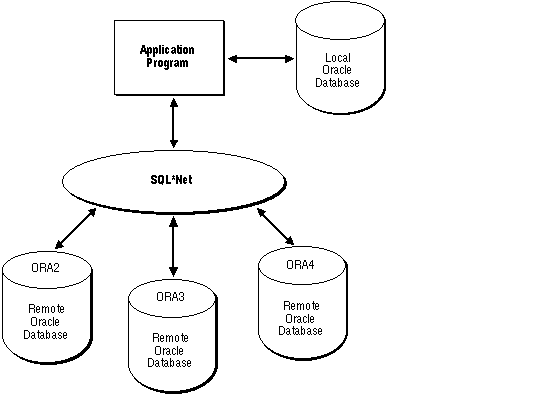 Figure 3 - 2. Connecting via SQL*Net
By eliminating the boundaries in a network between different machines and operating systems, SQL*Net provides a distributed processing environment for Oracle tools. This section shows you how the Pro*Ada Precompiler supports distributed processing via SQL*Net. You learn how your application can:
Additional Information: Consult your platform-specific Oracle documentation for additional information.
A protocol is a set of rules for accessing a network. The rules establish such things as procedures for recovering after a failure and formats for transmitting data and checking errors. All the examples in this section use the DECnet network access protocol.
The SQL*Net syntax for connecting to the default database on a remote node via DECnet is
d:node
where d specifies the network (DECnet) and node specifies the remote node.
The syntax for connecting to a non-default database on a remote node via DECnet is
d:node-database
where database specifies the non-default database.
See the Oracle Network Manager Administrator's Guide for the specific syntax required when using other protocols.
A default connection is made by a CONNECT statement that has no AT clause. The connection can be to any default or non-default database at any local or remote node. SQL statements without an AT clause are executed against the default connection. Conversely, a non-default connection is made by a CONNECT statement that has an AT clause. SQL statements with an AT clause are executed against the non-default connection.
All database names must be unique, but two or more database names can specify the same connection. That is, you can have multiple connections to any database on any node.
EXEC SQL CONNECT :USERNAME IDENTIFIED BY :PASSWORD;
You can also use
EXEC SQL CONNECT :USR_PWD;
where USR_PWD contains username/password or username/password@connect_string.
You can automatically log on to Oracle with the userid
OPS$username
where username is your current operating system user or task name and OPS$username is a valid Oracle userid. You simply pass to the precompiler a slash (/) character, as follows:
ORACLEID constant string(1..1) := "/";
....
EXEC SQL CONNECT :ORACLEID;
This automatically connects you as user OPS$username.
If you do not specify a database and node, you are connected to the default database at the current node. If you want to connect to a different database, you must explicitly identify that database.
With explicit logons, you connect to another database directly, giving the connection a name that will be referenced in SQL statements. You can connect to several databases at the same time and to the same database multiple times.
-- declare needed host variables
USERNAME constant string(1..5) := "SCOTT";
PASSWORD constant string(1..5) := "TIGER";
DB_STRING constant string(1..16) := "d:newyork-nondef";
...
-- give the database connection a unique name
EXEC SQL DECLARE db_name DATABASE;
-- connect to the non-default database
EXEC SQL CONNECT :USERNAME IDENTIFIED BY :PASSWORD
AT db_name USING :DB_STRING;
The identifiers in this example serve the following purposes:
You must execute a DECLARE db_name DATABASE statement before executing a CONNECT ... AT DB_NAME statement.
EXEC SQL AT db_name SELECT ...
EXEC SQL AT db_name INSERT ...
EXEC SQL AT db_name UPDATE ...
EXEC SQL AT db_name DECLARE emp_cursor CURSOR FOR ...
EXEC SQL OPEN emp_cursor ...
EXEC SQL FETCH emp_cursor ...
EXEC SQL CLOSE emp_cursor;
When OPENing, CLOSing, or FETCHing from the cursor, you do not use the AT clause. The SQL statements are executed at the database named in the AT clause of the DECLARE CURSOR statement or at the default database if no AT clause is used in the cursor declaration.
-- declare needed host variables
USERNAME constant string(1..5) := "SCOTT";
PASSWORD constant string(1..5) := "TIGER";
DB_STRING1 constant string(1..17) := "d:newyork-nondef1";
DB_STRING2 constant string(1..17) := "d:chicago-nondef2";
...
-- give each database connection a unique name
EXEC SQL DECLARE db_name1 DATABASE;
EXEC SQL DECLARE db_name2 DATABASE;
-- connect to the two non-default databases
EXEC SQL CONNECT :USERNAME IDENTIFIED BY :PASSWORD
AT db_name1 USING :DB_STRING1;
EXEC SQL CONNECT :USERNAME IDENTIFIED BY :PASSWORD
AT db_name2 USING :DB_STRING2;
The undeclared identifiers db_name1 and db_name2 are used to name the default databases at the two non-default nodes so that later SQL statements can refer to the databases by name.
For example, suppose you are working with two accounting databases. You debit an account on one database and credit an account on the other database, then issue a COMMIT at each database. It is up to your program to ensure that both transactions are committed or rolled back.
The distributed query facility depends on database links that assign a name to a CONNECT statement rather than to the connection itself. At run time, the embedded SELECT statement is executed by the specified Oracle Server that implicitly connects to the non-default database(s) to get the required data.
EXEC SQL CREATE DATABASE LINK db_link
CONNECT TO username IDENTIFIED BY password
USING 'd:newyork-nondef';
Then, the program can query the non-default EMP table using the database link, as follows:
EXEC SQL SELECT ENAME, JOB INTO :EMP_NAME, :JOB_TITLE
FROM emp@db_link
WHERE DEPTNO = :DEPT_NUMBER;
The database link is not related to the database name used in the AT clause of an embedded SQL statement. It simply tells Oracle where the non-default database is located, the path to it, and what Oracle username and password to use. The database link is stored in the data dictionary until it is explicitly dropped.
In our example, the default Oracle Server logs on to the non-default database via SQL*Net using the database link db_link. The query is submitted to the default Server, but is "forwarded" to the non-default database for execution.
To make referencing the database link easier, you can create a synonym as follows (again, this is usually done interactively):
EXEC SQL CREATE SYNONYM emp FOR emp@db_link;
Then, your program can query the non-default EMP table, as follows:
EXEC SQL SELECT ENAME, JOB INTO :EMP_NAME, :JOB_TITLE
FROM emp
WHERE DEPTNO = :DEPT_NUMBER;
This provides location transparency for EMP.
EXEC SQL CREATE DATABASE LINK db_link1
CONNECT TO username1 IDENTIFIED BY password1
USING 'd:newyork-nondef';
EXEC SQL CREATE DATABASE LINK db_link2
CONNECT TO username2 IDENTIFIED BY password2
USING 'd:chicago-nondef';
EXEC SQL CREATE SYNONYM emp FOR emp@db_link1;
EXEC SQL CREATE SYNONYM dept FOR dept@db_link2;
Then, your program can query the non-default EMP and DEPT tables, as follows:
EXEC SQL SELECT ENAME, JOB, SAL, LOC
FROM emp, dept
WHERE emp.DEPTNO = dept.DEPTNO AND DEPTNO = :DEPT_NUMBER;
Oracle executes the query by performing a join between the non-default EMP table at db_link1 and the non-default DEPT table at db_link2.
|
Prev Next |
 Copyright © 1996 Oracle Corporation. All Rights Reserved. |
Library |
Product |
Contents |
Index |