| Programmer's Guide to the Pro*C/C++ Precompiler |  Library |
 Product |
 Contents |
 Index |
| Programmer's Guide to the Pro*C/C++ Precompiler | Library |
Product |
Contents |
Index |


When called by an Oracle Forms V3 trigger, the user exit runs, then returns a status code to Oracle Forms. Your exit can display messages on the Oracle Forms status line, get and set field values, do high-speed computations and table lookups, and manipulate Oracle data.
Figure 13 - 1 shows how an Oracle Forms application interacts with a user exit.
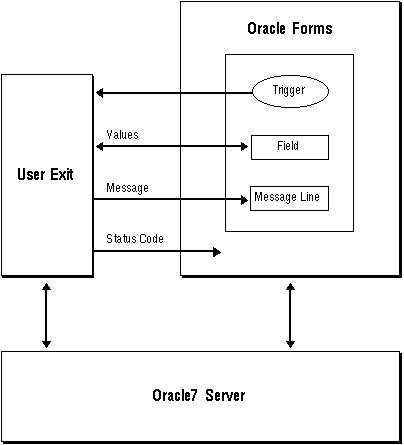 Figure 13 - 1. Oracle Forms and a User Exit
![[*]](jump.gif) . To incorporate a user exit into a form, you take the following steps:
. To incorporate a user exit into a form, you take the following steps:
Note: Indicator variables are not allowed in EXEC IAF GET and PUT statements.
EXEC IAF GET field_name1, field_name2, ...
INTO :host_variable1, :host_variable2, ...;
where field_name can be any of the following SQL*Forms variables:
EXEC IAF GET employee.job INTO :new_job;
All field values are character strings. If it can, GET converts a field value to the datatype of the corresponding host variable. If an illegal or unsupported datatype conversion is attempted, an error is generated.
In the last example, a constant is used to specify block.field. You can also use a host string to specify block and field names, as follows:
char blkfld[20] = "employee.job";
EXEC IAF GET :blkfld INTO :new_job;
Unless the field is in the context block, the host string must contain the full block.field reference with intervening period. For example, the following usage is invalid:
char blk[20] = "employee";
strcpy(fld, "job");
EXEC IAF GET :blk.:fld INTO :new_job;
You can mix explicit and stored field names in a GET statement field list, but not in a single field reference. For example, the following usage is invalid:
strcpy(fld, "job");
EXEC IAF GET employee.:fld INTO :new_job;
EXEC IAF PUT field_name1, field_name2, ...
VALUES (:host_variable1, :host_variable2, ...);
where field_name can be any of the following SQL*Forms variables:
EXEC IAF PUT employee.number, employee.name, employee.job
VALUES (7934, 'MILLER', :new_job);
Like GET, PUT lets you use a host string to specify block and field names, as follows:
char blkfld[20] = "employee.job";
EXEC IAF PUT :blkfld VALUES (:new_job);
On character-mode terminals, a value PUT into a field is displayed when the user exit returns, rather than when the assignment is made, provided the field is on the current display page. On block-mode terminals, the value is displayed the next time a field is read from the device.
If a user exit changes the value of a field several times, only the last change takes effect.
USER_EXIT(user_exit_string [, error_string]);
where user_exit_string contains the name of the user exit plus optional parameters and error_string contains an error message issued by SQL*Forms if the user exit fails. For example, the following trigger command calls a user exit named LOOKUP:
USER_EXIT('LOOKUP'); Notice that the user exit string is enclosed by single (not double) quotes.
Command Line Is the user exit string.
Command Line Length Is the length (in characters) of the user exit string.
Error Message Is the error string (failure message) if one is defined.
Error Message Length Is the length of the error string.
In-Query Is a Boolean value indicating whether the exit was called in normal or query mode.
However, the user exit string allows you to pass additional parameters to the user exit. For example, the following trigger command passes two parameters and an error message to the user exit LOOKUP:
Notice that the user exit string is enclosed by single (not double) quotes.
USER_EXIT('LOOKUP 2025 A', 'Lookup failed'); You can use this feature to pass field names to the user exit, as the following example shows:
USER_EXIT('CONCAT firstname, lastname, address'); However, it is up to the user exit, not SQL*Forms, to parse the user exit string.
success
The user exit encountered no errors. SQL*Forms proceeds to the success label or the next step, unless the Reverse Return Code switch is set by the calling trigger step.
failure
The user exit detected an error, such as an invalid value in a field. An optional message passed by the exit appears on the message line at the bottom of the SQL*Forms screen and on the Display Error screen. SQL*Forms responds as it does to a SQL statement that affects no rows.
fatal error
The user exit detected a condition that makes further processing impossible, such as an execution error in a SQL statement. An optional error message passed by the exit appears on the SQL*Forms Display Error screen. SQL*Forms responds as it does to a fatal SQL error. If a user exit changes the value of a field, then returns a failure or fatal error code, SQL*Forms does not discard the change. Nor does SQL*Forms discard changes when the Reverse Return Code switch is set and a success code is returned.
SQLIEM (char *error_message, int message_length);
where error_message and message_length are character and integer variables, respectively. The Pro*C Precompiler generates the appropriate external function declaration for you. You pass both parameters by reference; that is, you pass their addresses, not their values. SQLIEM is a SQL*Forms function; it cannot be called from other Oracle tools such as SQL*ReportWriter.
int
myexit()
{
    char field1[20], field2[20], value1[20], value2[20];
    char result_value[20];
    char errmsg[80];
    int errlen;

    #include sqlca.h
    EXEC SQL WHENEVER SQLERROR GOTO sql_error;
    /* get field values into form */
    EXEC IAF GET :field1, :field2 INTO :value1, :value2;
    /* manipulate the values to obtain result_val */
    ...
    /* put result_val into form field result */
    EXEC IAF PUT result VALUES (:result_val);
    return IAPSUCC;   /* trigger step succeeded */

sql_error:
    strcpy(errmsg, CONCAT("MYEXIT", sqlca.sqlerrm.sqlerrmc);
    errlen = strlen(errmsg);
    sqliem(errmsg, &errlen); /* send error msg to Forms */
    return IAPFAIL;
/**************************************************************
Sample Program 5:  SQL*Forms User Exit

This user exit concatenates form fields.  To call the user
exit from a SQL*Forms trigger, use the syntax

   user_exit('CONCAT field1, field2, ..., result_field');

where user_exit is a packaged procedure supplied with SQL*Forms
and CONCAT is the name of the user exit.  A sample form named
CONCAT invokes the user exit.
**************************************************************/

#define min(a, b) ((a < b) ? a : b)
#include <stdio.h>
#include <string.h>

/* Include the SQL Communications Area, a structure through which
   Oracle makes runtime status information such as error
   codes, warning flags, and diagnostic text available to the
   program. */

EXEC SQL INCLUDE sqlca;

/* All host variables used in embedded SQL must appear in the
   Declare Section. */

VARCHAR   field[81];
VARCHAR   value[81];
VARCHAR   result[241];

int concat(cmd, cmdlen, msg, msglen, query)

char *cmd;     /* command line in trigger step ("CONCAT...") */
int  *cmdlen;  /* length of command line */
char *msg;     /* trigger step failure message from form */
int  *msglen;  /* length of failure message */
int  *query;   /* TRUE if invoked by post-query trigger,
                  FALSE otherwise */
{
    char *cp = cmd + 7;    /* pointer to field list in
                              cmd string; 7 characters
                              are needed for "CONCAT " */
    char *fp = (char*)&field.arr[0]; /* pointer to a field name in
                                         cmd string */
    char  errmsg[81];      /* message returned to SQL*Forms
                              on error */
    int   errlen;          /* length of message returned
                              to SQL*Forms */

    /* Branch to label sqlerror if an Oracle error occurs. */
    EXEC SQL WHENEVER SQLERROR GOTO sqlerror;

    result.arr[0] = '\0';
    /* Parse field names from cmd string. */
    for (; *cp != '\0'; cp++)
    {
       if (*cp != ',' && *cp != ' ')
           /* Copy a field name into field.arr from cmd. */
       {
           *fp = *cp;
           fp++;
       }
       else
           if (*cp == ' ')
           {   /* Have whole field name now. */
               *fp = '\0';
               field.len = strlen((char *) field.arr);
               /* Get field value from form. */
               EXEC IAF GET :field INTO :value;
               value.arr[value.len] = '\0';
               strcat((char *) result.arr, (char *) value.arr);
              /* Reset field pointer. *
               fp = (char *)&field.arr[0];/
           }
    }

    /* Have last field name now. */
    *fp = '\0';
    field.len = strlen((char *) field.arr);
    result.len = strlen((char *) result.arr);
    /* Put result into form. */
    EXEC IAF PUT :field VALUES (:result);
    return(IAPSUCC);  /* Trigger step succeeded. */

sqlerror:
    strcpy(errmsg, "CONCAT: ");
    strncat(errmsg, sqlca.sqlerrm.sqlerrmc, min(72,
        sqlca.sqlerrm.sqlerrml));
    errlen = strlen(errmsg);
    /* Pass error message to SQL*Forms status line. */
    sqliem(errmsg, &errlen);
    return(IAPFAIL);  /* Trigger step failed. */
}
RUNFORM GENXTB username/password
A form is displayed that allows you to enter the following information for each user exit you define:
)
GENXTB username/password outfile
where outfile is the name you give the Assembler or C source program that GENXTB creates.
To produce a new executable copy of IAP, link your user exit object module, the standard IAP modules, the IAPXIT module, and any modules needed from the Oracle and C link libraries.
The details of linking are system-dependent. Check the Oracle installation or user's guide for your system.
SQL*Forms converts the name of a user exit to upper case before searching for the exit. Therefore, the exit name must be in upper case in your source code.
.
EXEC TOOLS SET form_variable[, ...]
VALUES ({:host_variable :indicator | constant}[, ...]); where form_variable is an Oracle Forms field, block.field, system variable, or global variable, or a host variable (prefixed with a colon) containing the value of one of the foregoing items. In the following example, a user exit passes an employee name to Oracle Forms:
char ename[20];
short ename_ind;
...
strcpy(ename, "MILLER");
ename_ind = 0;
EXEC TOOLS SET emp.ename VALUES (:ename :ename_ind);
In this example, emp.ename is an Oracle Forms block.field.
EXEC TOOLS GET form_variable[, ...]
INTO :host_variable:indicator[, ...];
where form_variable is an Oracle Forms field, block.field, system variable, or global variable, or a host variable (prefixed with a colon) containing the value of one of the foregoing items. In the following example, Oracle Forms passes an item name from a block to your user exit:
...
char name_buff[20];
VARCHAR name_fld[20];
strcpy(name_fld.arr, "EMP.NAME");
name_fld.len = strlen(name_fld.arr);
EXEC TOOLS GET :name_fld INTO :name_buff;
EXEC TOOLS SET CONTEXT :host_pointer_variable
IDENTIFIED BY context_name;
where context_name is an undeclared identifier or a character host variable (prefixed with a colon) that names the context area.
...
char *context_ptr;
char context[20];
strcpy(context, "context1")
EXEC TOOLS SET CONTEXT :context IDENTIFIED BY application1;
EXEC TOOLS GET CONTEXT context_name
INTO :host_pointer_variable;
where context_name is an undeclared identifier or a character host variable (prefixed with a colon) that names the context area. In the following example, your user exit retrieves context information saved earlier:
...
char *context_ptr;
EXEC TOOLS GET CONTEXT application1 INTO :context_ptr;
EXEC TOOLS MESSAGE message_text [severity_code];
where message-text is a quoted string or a character host variable (prefixed with a colon), and the optional severity_code is an integer constant or an integer host variable (prefixed with a colon). The MESSAGE statement does not accept indicator variables. In the following example, your user exit passes an error message to Oracle Forms:
EXEC TOOLS MESSAGE 'Bad field name! Please reenter.';
|
Prev Next |
 Copyright © 1996 Oracle Corporation. All Rights Reserved. |
Library |
Product |
Contents |
Index |