| Oracle Context Option Application Developer's Guide |  Library |
 Product |
 Contents |
 Index |
| Oracle Context Option Application Developer's Guide | Library |
Product |
Contents |
Index |


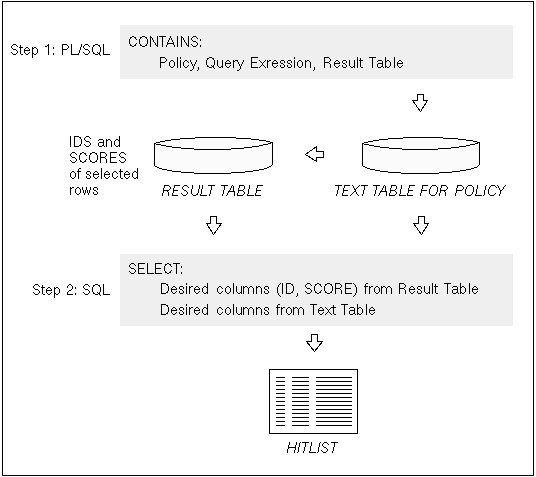 Figure 2 - 1. Two-Step Queries
create table CTX_TEMP(
textkey varchar2(64),
score number,
conid number);
	execute ctx_query.contains('ARTICLE_POLICY', \

		'petroleum', 'CTX_TEMP')
	SELECT SCORE, title
	FROM CTX_TEMP, TEXTTAB
	WHERE texttab.PK=ctx_temp.textkey
	ORDER BY SCORE DESC;
In this example, the articles with the highest scores appear first in the hitlist because the results are sorted by score in descending order.
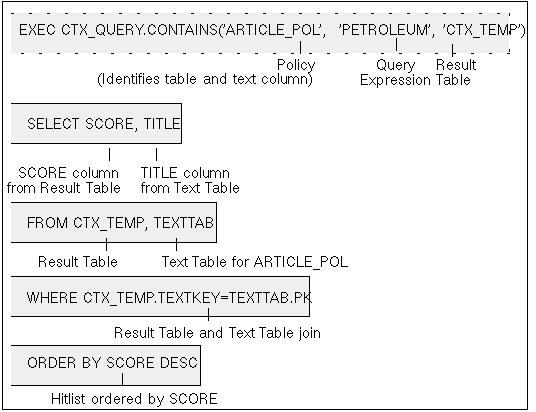 Figure 2 - 2. Diagram of a Two-Step Query
For example:
CREATE VIEW SURVEY AS SELECT * FROM TEXTTAB, CTX_TEMP
WHERE PK = TEXTKEY;
SELECT SCORE, AUTHOR FROM SURVEY
ORDER BY SCORE DESC;
In this example:
For more information about creating policies for composite textkey tables, refer to the Oracle ConText Option Administrator's Guide.
In addition, before the two-step query, create a result table in which the number of TEXTKEY columns match the number of columns in the composite textkey in the document table. You can create the result table manually or using the CTX_QUERY.GETTAB procedure.
For example, to manually create a result table with a composite textkey consisting of two columns:
create table CTX_TEMP2(
textkey varchar2(64),
textkey2 varchar2(64),
score number,
conid number);
In the two-step query, use the AND operator in the WHERE condition when you join the result and text tables. For example:
	exec ctx_query.contains('ARTICLE2_POLICY',\

	'petroleum',\

	'CTX_TEMP2')
	SELECT SCORE, title
	FROM CTX_TEMP2, TEXTTAB2
	WHERE texttab2.PK=ctx_temp2.textkey AND
	      texttab2.PK2=ctx_temp2.textkey2
	ORDER BY SCORE DESC;
The CTX_QUERY.CONTAINS procedure provides an additional parameter, STRUCT_QUERY, for specifying the WHERE condition in a structured query. For example, to select all news articles that contain the word Oracle that were written on or after October 1st, 1996, you might use:
exec ctx_query.contains('news_text','Oracle','res_tab',\
struct_query => 'issue_date >= (''1-OCT-1996'')')Executing a structured query in this way improves performance over processing a query on a text column and then refining the hitlist by applying a where condition against a structured column. This is especially so when the selectivity of the where condition is high, because when you use the structured query parameter, the ConText server executes the entire query without first writing out a potentially large hitlist to be refined later by the Oracle server.
Note: If the user who includes a structured query in a two-step query is not the owner of the table containing the structured and text columns, the user must have SELECT privilege with GRANT OPTION on the table. In addition, if the object being queried is a view, the user must have SELECT privilege with GRANT OPTION on the base table for the view.
SELECT privilege with GRANT OPTION can be granted to a user using the GRANT command in SQL.
For more information, see Oracle7 Server SQL Reference.
Note: Database links are created using the CREATE DATABASE LINK command in SQL.
For more information about creating database links, see Oracle7 Server SQL Reference.
To perform a two-step query for a text column in a remote database, the database link for the remote database is specified in the CONTAINS procedure as part of the policy for the column in the remote database.
In addition, the result table specified in CONTAINS must exist in the remote database and the user performing the query must have the appropriate privileges on the result table.
For example:
	exec ctx_query.contains('MY_POL@DB1', \
	'petroleum','CTX_TEMP')
In this example, MY_POL exists in a remote database identified by the database link DB1. The CTX_TEMP result table exists in the same remote database.
For more information about remote queries and distributed databases, see Oracle7 Server Concepts.
When the CONTAINS procedure is called in a two-step query, the PARALLEL argument can be used to specify the number of ConText servers, up to the total number of ConText servers running with the Query personality, that are used to process two-step queries and write the results to the result table.
For example:
	execute ctx_query.contains('ARTICLE_POLICY',\

	'petroleum', 'CTX_TEMP', parallel=>2)
In this example, the text column in the ARTICLE_POLICY policy is queried for documents that contain the term petroleum. The query is processed in parallel by any two available ConText servers with the Query personality and the results are written to CTX_TEMP.
If you want to include scores in the hitlist returned by a two-step query, the scores must be selected from the result table in the second step of the query.
Hitlist tables can be named anything; however they must have the following structure:
| Column Name: | Column Datatype: | Purpose: |
| TEXTKEY | VARCHAR2(64) | Stores textkeys of the rows satisfying the query |
| SCORE | NUMBER | Stores the score for each row (document) |
| CONID | NUMBER | Stores the CONTAINS ID when multiple CONTAINS procedures utilize the same result table |
Usage of a shared results table is controlled by the application through the SHARE LEVEL and the QUERY ID parameters of the CONTAINS procedure. If the result table is shared, the CONTAINS procedure must specify that SHARE LEVEL = 1 and include a unique QUERY ID so that each result can be distinguished from others in the result table.
If SHARE LEVEL = 0 then:
The following examples show two different ways in which to create a result table with a two column composite textkey within SQL*Plus.
/* create composite textkey result table manually */
create table ctx_temp(
textkey varchar(64),
textkey2 varchar(64),
score number,
conid number);
/* allocate composite textkey result table with CTX_QUERY.GETTAB() */
exec ctx_query.gettab(CTX_QUERY.HITTAB, :hit_tab, 2)
Note: Before one-step queries can be executed, the database in which the text resides must be text enabled by setting the ConText Option initialization parameter TEXT_ENABLE = TRUE. This can be done in two ways:
For more information about using the ALTER SESSION command, see Oracle7 Server SQL Reference.
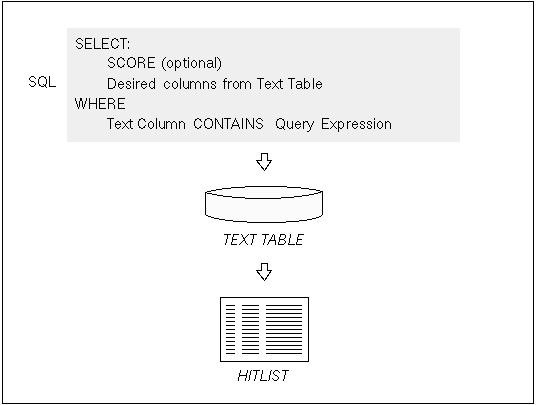 Figure 2 - 3. One-Step Queries
	SELECT *
	FROM texttab
	WHERE CONTAINS (text, 'petroleum') > 0;
Because ConText Option functions execute within normal SQL statements, all of the capabilities for selecting and querying normal structured data fields, as well as text, are available. For instance, in the example, if the text table had a column listing the date the article was published, the user could select articles based on that date as well as the content of the text column.
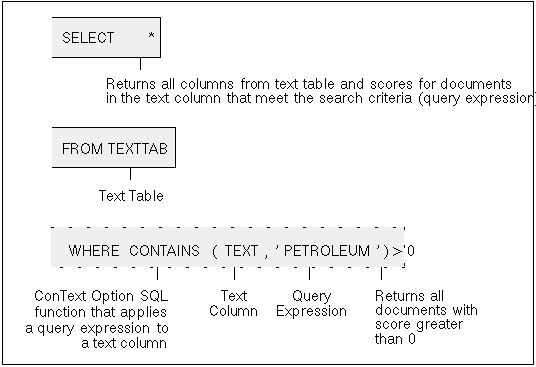 Figure 2 - 4. Diagram of a One-Step Query
Note: The asterisk wildcard character ( * ) in Figure 2 - 4 specifies that the record set returned by the query includes all the columns of the text table for the selected documents, as well as the scores generated for each document. If a query has more than one CONTAINS function, the asterisk wildcard does not return scores for the multiple CONTAINS and the SCORE function must be called explicitly. See "Scoring" in this chapter for an example.
You cannot issue the CONTAINS function in the WHERE clause of an UPDATE, INSERT or DELETE statement.
To perform a one-step query for a text column in a remote database, the database link for the remote database is specified as part of the table name in the SELECT clause.
For example:
	SELECT *
	FROM texttab@db1
	WHERE CONTAINS (text, 'petroleum') > 0;
In this example, texttab exists in a remote database identified by the database link DB1.
Note: One-step queries do not support querying LONG and LONG RAW columns in remote database tables.
For more information about creating database links, see Oracle7 Server SQL Reference.
For more information about remote queries and distributed databases, see Oracle7 Server Concepts.
If multiple ConText servers with the Query personality are running and a one-step query with multiple CONTAINS is executed, the query is processed in parallel. Each CONTAINS function is evaluated by one of the available ConText servers and the results from the servers are combined before they are returned to the user.
Suggestion: If your application makes use of multiple CONTAINS in one-step queries, ensure that multiple ConText servers with the Query personality are running to optimize query performance. The number of ConText servers should be at least equal to the number of CONTAINS you support in one-step queries for the application.
Each CONTAINS function in a query produces a separate score. When there are multiple CONTAINS functions, each CONTAINS function must have a label (a number) so the SCORE value can be identified in other clauses of the SELECT statement.
The SCORE function may be used in a SELECT list, an ORDER BY clause or a GROUP BY clause.
For example:
SELECT SCORE (10), SCORE(20), title FROM DOCUMENTS
	WHERE CONTAINS (TEXT, 'holmes,' 10)
	OR CONTAINS (TEXT, 'moriarty', 20)
	OR CONTAINS (TEXT, 'baker street', 30)
	ORDER BY SCORE(10)
	GROUP BY SCORE(30)
The process for performing in-memory queries is the following:
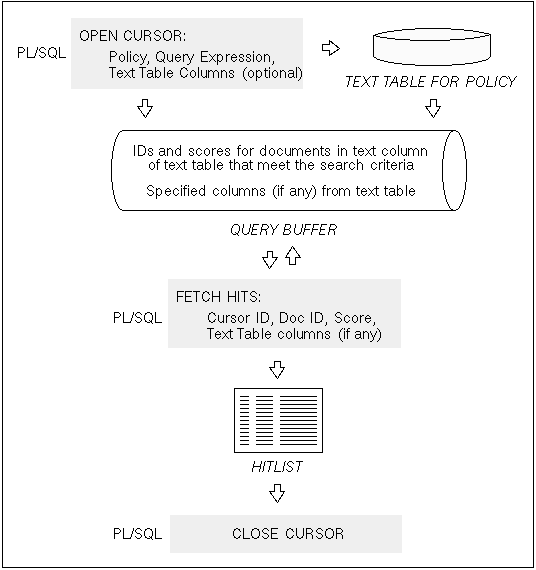 Figure 2 - 5. In-Memory Queries
declare
  score  char(5);
  pk     char(5);
  curid  number;
  title  char(256);

begin
  dbms_output.enable(100000);
  curid := ctx_query.open_con(
                        policy_name  =>  'ARTICLES_POL',
                        text_query   =>  'petroleum',
                        score_sorted =>  true,
                        other_cols   =>  'title');
  while (ctx_query.fetch_hit(curid, pk, score, title)>0)
   loop
    dbms_output.put_line(score||pk||substr(title,1,50));
   end loop;
  ctx_query.close_con(curid);
end;
In this example, the TITLE column from the table is also returned by OPEN_CON, so a variable must be declared for TITLE.
DBMS_OUTPUT.ENABLE sets the buffer size to the maximum of 100000 bytes (1 Mb) to ensure that the buffer is large enough to hold the results of the query.
The SCORE_SORTED argument in OPEN_CON is set to 'true' which causes OPEN_CON to store the hits in the query buffer in descending order by score.
FETCH_HITS is called in a loop to fetch SCORE, PK, and TITLE for each hit until a value less than zero is returned, indicating that the buffer is empty.
DBMS_OUTPUT.PUT_LINE prints the results to the standard output.
For more information about the DBMS_OUTPUT PL/SQL package, see Oracle7 Server Application Developer's Guide.
Note: Database links are created using the CREATE DATABASE LINK command in SQL.
For more information about creating database links, see Oracle7 Server SQL Reference.
To perform an in-memory query for a text column in a remote database, the database link for the remote database is specified in the OPEN_CON procedure as part of the policy for the column in the remote database.
In addition, the result table specified in CONTAINS must exist in the remote database and the user performing the query must have the appropriate privileges on the result table.
For more information about remote queries and distributed databases, see Oracle7 Server Concepts.
This operator is particularly useful to prevent writing a large number of records to the hitlist table, which could result in performance degradation. However, there are some limitations to using this operator.
The disadvantage of this scheme is that mixed queries might not return the desired results.
For example, suppose you have a query that would normally return 1000 hits. If you use the maximum documents operator to limit the number of hits to 100, for a simple query, you will get the top 100 hits ordered by score. However, if you add a structured condition, and the 900 hits that you cut out of your query happen to match the structured condition, you will not have those results returned.
The following table illustrates the various advantages and disadvantages to the different methods:
|
Prev Next |
 Copyright © 1996 Oracle Corporation. All Rights Reserved. |
Library |
Product |
Contents |
Index |