

CHAPTER 6. Linguistic Concepts
This chapter describes the approach used by Linguistic Services to provide advanced analysis of English-language text.
The following topics are covered in this chapter:
Overview of the Linguistic Services
ConText Option's Linguistic Services are used to analyze the content of English-language documents. The application developer uses Linguistics Services to create different views of the contents of documents that allow the user to quickly review the essential content of documents and determine their relevance.
Because these services are separate and distinct from text indexing, an application developer can incorporate linguistic analysis and functionality in a text application, independent of the text/theme indexing process.
This section covers the following topics:
What are the Linguistic Services?
Linguistic Services currently provide two facilities for abbreviating English-language documents stored in an Oracle database:
Themes and Gists can be used to build text applications that enable users to quickly filter out documents that are of little or no interest to them, allowing users to easily pinpoint and retrieve information that is important to them. In addition, filtering can help reduce network loads on an application as less data needs to be transferred in a client-server environment.
The only requirements for using the Linguistic Services are:
- text stored in a column (either directly or indirectly through a pathname to OS files)
Note: These setup requirements apply to ConText indexes (text/theme) as well as the Linguistic Services. The procedures for storing text and creating policies is not discussed in this manual.
For more information about storing text in columns and creating policies for the columns, see Oracle ConText Option Administrator's Guide.
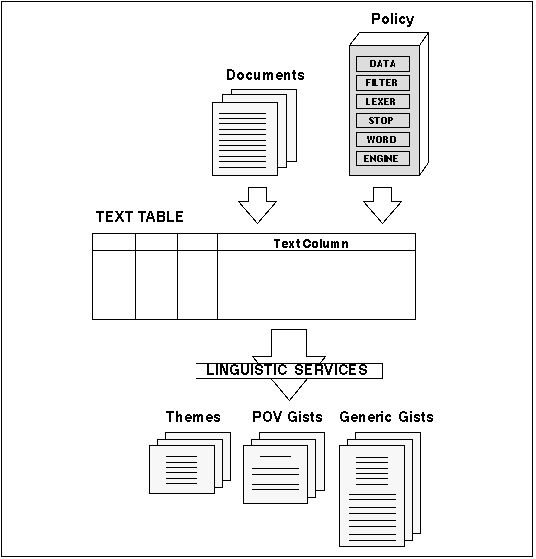 Figure 6 - 1. Overview of Linguistic Services
How Do the Linguistic Services Work?
Most currently available text analysis systems typically rely more on word repetition than true understanding of the text.
The Linguistic Services apply linguistic rather than statistical methods (although statistical data is used in the analysis) to the text being processed. While traditional linguistic methods usually stop after determining grammar and syntax, Linguistic Services add the dimensions of theme and semantics.
The Linguistic Services focus on grammatical content and theme to determine the actual meaning of the text being processed. The Linguistic Services recognize that the position and role of a word, more than the repeated occurrence of the word, influences how the word contributes to the meaning of the surrounding text.
Linguistic Personality
When a ConText server is started with the Linguistic personality, the server can process any requests for Linguistic Services. A ConText server with the Linguistic personality may also have other personalities in its personality mask.
Starting up ConText servers is the task of the ConText Option administrator, through the CTXSYS Oracle user.
For more information about the Linguistic personality and specifying personality masks for ConText servers, see Oracle ConText Option Administrator's Guide.
Services Queue
The Services Queue is used for managing Linguistic Services requests. A request for the Linguistic Services is cached in memory until the requestor submits the request, at which time the request is added to the Services Queue. If more than one request is cached in memory when the user submits the requests, ConText Option stores all of the requests as a single batch job.
If a ConText server has the appropriate Linguistic personality, the server monitors the Service Queue for requests and processes the next request in the queue.
Note: If no ConText servers with the Linguistics personality are running, the Services Queue still accepts requests and holds the requests for the next available ConText server with the appropriate personality.
The ConText Option administration tool can be used to perform all administration functions on the Services Queue (e.g., cleaning up entries, etc.). In addition the CTX_SVC PL/SQL package can be used to perform ConText Option administration from the command-line.
Batch Mode vs. "On Demand" Processing
The Linguistic Services may be invoked on a batch-mode basis during the text indexing process or "on demand." Due to the independent nature of the Linguistic Services, no limitations are placed on the method used. The specific implementation is up to the application developer.
For example, if system requirements mandate fast text indexing, the developer would not want to request the Linguistic Services during text indexing, because linguistic processing can be time and CPU intensive.
On the other hand, if the application consists of a large set of fairly static data, and the end-user is interested in high-quality linguistic analysis, the services could be invoked by the application during the indexing process as a batch job.
Architecture
The implementation of the Linguistic Services is divided into the API layer and the linguistic core layer.
API
The PL/SQL Application Program Interface is used by an application to request specific Linguistic Services and store the results in a schema that is appropriate to the application. In addition, the PL/SQL APIs can also be used to perform low-level administrative tasks for the Linguistic Services.
Linguistic Core
The Context Option linguistic core processes text through the Linguistic Services requests and generates the requested linguistic output.
Application Program Interface (API)
The Linguistic Services and queue management functions are invoked by using PL/SQL procedures called or executed within the programming language in which the application is developed. If the application is developed in PL/SQL, these procedures may be invoked directly as PL/SQL execute statements. If the application is developed in another language, such as C, the PL/SQL procedures for linguistic and queue management functions are accessed through the Oracle Call Interface (OCI).
ConText Option provides the following PL/SQL packages for using the Linguistic Services and managing the Services Queue, respectively:
The stored procedures in CTX_LING are used to request Linguistic Services and submit the requests to the Services Queue. CTX_LING also provides procedures for specifying user settings for the Linguistic Services and enabling logging of parse information generated during the processing of a request.
The model for submitting requests and querying the linguistic output is similar to the two-step query model (CONTAINS procedure) provided within the ConText Option framework for content-based text retrieval.
To generate themes for a document, the application first creates a table to store the results of the theme generation, then the themes are generated by calling the CTX_LING.REQUEST_THEMES procedure followed by the CTX_LING.SUBMIT function. ConText Option stores the results in the table named THEME_TAB. To view the results, the application would then issue a SELECT statement to select tZhe theme from the output table.
The stored procedures in CTX_SVC are used to monitor the Services Queue for the status of specific requests. CTX_SVC can be used to check the status of pending requests, display errors encountered, and cancel the request if it has not been picked up for processing by a ConText server or clear the request if it has encountered an error.
Linguistic Core
The linguistic core is comprised of five major components:
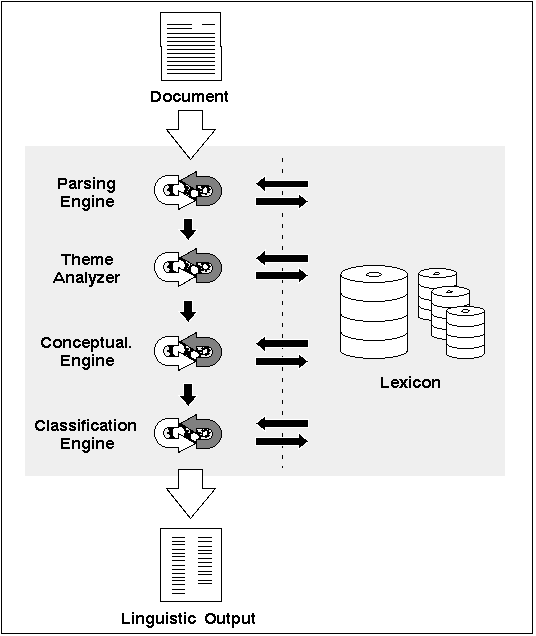 Figure 6 - 2. The Linguistic Services linguistic core
Lexicon
The lexicon is a static knowledge base that provides word and phrase definitions for the parsing engine. The lexicon recognizes over one million English words and phrases and defines hundreds of lexical characteristics for each word.
Note: The lexicon is specific to the English language, but it recognizes the difference between American and British usage and spelling.
Information about each word in the lexicon is stored in two logical areas:
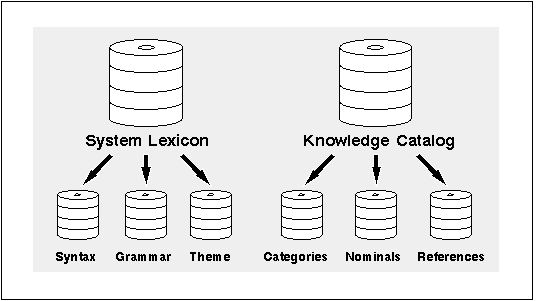 Figure 6 - 3. The Linguistic Services lexicon
System Lexicon
The system lexicon is an extensive, dictionary-like collection of more than one million English words and phrases, with up to one thousand pieces of linguistic information about each word.
Linguistic information about words in the lexicon is divided into three types:
Knowledge Catalog
The knowledge catalog stores terms and phrases used in more than one thousand industries and fields of study, creating a classification scheme of several hundred thousand concepts that define ConText Option's semantic view of the world.
The knowledge catalog is organized as a hierarchy of concepts. When a parent concept subsumes one or more concepts, the parent concept is called a category.
The knowledge catalog is divided into the following six main categories:
- abstract ideas and concepts
These categories are divided further into more categories and concepts. For instance, the concept of jazz music is defined by the following hierarchy:
social environment
arts and entertainment
performing arts
music
jazz music
Additional semantic relationships are represented by cross references that link concepts from different clusters of the hierarchy.
When ConText analyses documents for theme extraction and theme indexing, concepts must be converted into their canonical forms before they can attach into the knowledge hierarchy and be returned to the user as themes. To make this conversion, the knowledge catalog keeps the following lists:
For more information about creating theme indexes, see "Creating a Theme Index" in "Theme Queries (Chapter 4)."
Parsing Engine
The parsing engine identifies paragraph, sentence, and token (word) boundaries, as well as phrases and clauses. It then passes the tokens to the lexicon where grammar and theme flags are attached and linguistic analysis begins.
Once the static knowledge base (lexicon) identifies the grammatical function of each word in a sentence, using the word's placement in the sentence and its relationship to the surrounding words, the parsing engine determines the thematic function of the word in the sentence.
As the parsing engine encounters successively larger text blocks (sentences, paragraphs, and the whole document), it expands the analysis to add new information about the text to its knowledge base.
If case-conversion is enabled, the parsing engine converts all the text to lowercase and processes the text through the case-sensitivity routines to determine proper capitalization.
Note: Case conversion does not affect the original text of the documents being processed; only the output of the parsing engine is stored in mixed-case.
Theme Analyzer
The theme analyzer examines text at the sentence level to determine how each word in a sentence is functioning within the context and structure of the sentence. The theme analyzer uses these and other criteria to identify the theme- and information-bearing elements of a sentence.
Conceptualization Engine
The Conceptualization Engine generates raw data in a classification format for document themes and calculates the relative importance of each theme, measured in theme weight, to the other themes in the document.
Classification Engine
The Classification Engine uses semantic information generated by the Linguistic Services to classify each theme for a document into an industry or field of study.
Text Input
The Linguistic Services have the following requirements and restrictions for text input:
Word and Sentence Recognition
Each word and sentence should be clearly identified using standard conventions such as blank spaces and recognized punctuation. Complete sentences produce the best results, but are not required. The Linguistic Services can process incomplete sentences as well as text in headers and lists.
Paragraph Recognition
To successfully process text, the Linguistic Services require documents to be separated into paragraphs. The method by which the paragraph delimiters are recognized is based on whether the text is formatted.
Formatted Text
In formatted text, the filters used to extract the text must provide paragraph delimiters that can be recognized by ConText Option.
The internal filters provided by ConText Option automatically recognize the paragraph delimiters used in the document format for the filter. Similarly, any external filters used for filtering text must recognize the paragraph delimiters used in the document format for the filter..
For more information about filters, see Oracle ConText Option Administrator's Guide.
Plain (ASCII) Text
With plain (ASCII) text, paragraph delimiters are determined on a per document basis by automated routines within the Linguistic Services. Each document is analyzed by these routines to determine the paragraph delimiters utilized in that document.
The paragraph recognition routines sample the first 8 Kilobytes of text in a document to identify the common method used to mark the beginning and end of paragraphs in the sample. That method is then applied to the rest of the document.
Document Size
The Linguistic Services can process documents of any size, up to a maximum size of 5 megabytes for a single document.
Note: If a Linguistic Services request is submitted for a document larger than 5 megabytes, the Linguistic Services return an error and do not generate output for the document.
Writing Styles
The Linguistic Services can analyze written material of all styles and subject matter. This includes technical manuals, literature of all types, newspapers and magazines, encyclopedias, and electronic-mail messages.
Linguistic Services are not as well-suited for processing transcriptions of unstructured, spoken words, such as colloquial dialogue or casual conversation. The Linguistic Services also do not work well with non-natural languages such as computer programming languages.
Linguistic Output
The Linguistic Services produce two types of output:
Themes
Themes present a profile of the main subjects or topics of a paragraph or document. In essence, they provide a quick snapshot of what the paragraph or document is about. Up to 16 themes may be generated for each paragraph and document. In addition, each theme is assigned a relative weight.
Note: The Linguistic Services only produces document-level themes. Paragraph themes are used internally for linguistic processing.
Themes can be used in a variety of applications, including automated summary-building, document classification, and document routing and filtering.
Theme Weight
Each document theme is assigned a weight that measures the strength of the theme relative to the other themes for the document.
The cumulative weight of a theme also reflects the overall thematic content of the document. As such, theme weights can be used to compare a document theme to other themes within the same document or to other documents with the same theme.
Theme Classification
The themes produced by the Linguistic Services are essentially document classifications. Each theme provides information that can be used to classify the document into a semantic world view (classification structure) defined by the user. For this reason, the Linguistic Services always normalize the terms and phrases in the theme output to their noun and plural forms, if applicable.
In addition, the theme output is not always a direct result of the actual terms and phrases found in a document. Often the output reflects the Linguistic Services' understanding of how themes are related.
For example, if a document provides an detailed discussion of MS-DOS and UNIX, the Linguistic Services will probably return DOS and UNIX as themes for the document; however, the Linguistic Services may also return operating systems as a theme, indicating that a relationship exists between DOS and UNIX. The document could be classified under DOS, UNIX, operating systems, or any combination of the three.
Gists
A Gist is a summary of a document and consists of selected paragraphs that reflect the themes of the document. Whole paragraphs are used to create Gists because paragraphs maintain continuity better than individual sentences and provide a better context for understanding the text.
To generate a Gist, the Linguistic Services extract the themes for each paragraph in a document and the themes for the document, then compare the paragraph themes to the document themes to select the paragraphs that best match thematically the document.
The Linguistic Services produce two types of Gists:
Point-of-View (POV) Gists
A POV Gist for a document provides a short summary of the document from a specific "point of view." It consists of the document paragraphs that provide the best match for a single document theme. If you enable a setting configuration that supports Gist generation, a POV Gist is created for each theme of a document.
Because it provides a concise, focused summary for a particular theme in a document, a POV Gists can be used to select a document from a list of documents with the same theme.
Settings can be specified to control the size of a POV Gist. For more information about the settings for POV Gists, see "User Settings" in this chapter.
Note: The settings for POV Gists can only be modified by creating custom setting configurations in the GUI administration tool.
Generic Gists
A generic Gist for a document provides a summary that reflects all of the themes in the document. It consists of the document paragraphs that provide the best match for the overall document themes.
Because a generic Gist is generally longer than a POV Gist, it serves better as a document reading tool than a document selection tool. For example, it can be used to quickly scan a document and extract the most meaningful thematic information, rather than reading the entire document.
Paragraphs in a generic Gist are selected according to four formulas. In addition, settings can be specified to control the size of the Gist and determine whether the first and last document paragraphs are always included in the Gist.
Note: The settings for generic Gist can only be modified by creating custom setting configurations in the GUI administration tool.
For more information about the settings for generic Gists, see "User Settings".
Uses for POV and Generic Gists
The following example shows a progression from a collection of articles to a generic Gist and illustrates how POV and generic Gists can be used in an application:
TABLE: You store documents (e.g., restaurant reviews) in a table and generate themes and Gists for each document.
\/
THEME:
You query the table for reviews about fruits and vegetables.
\/
HITLIST:
The appropriate ConText server returns a hitlist of reviews that have fruits and vegetables as a theme.
\/
POV GIST:
The hitlist includes a POV Gist for each review. Each POV Gist consists of the document paragraphs that are specifically about fruit and vegetables. You scan the POV Gists to determine which review contains fruits and vegetables content that you want to read.
\/
DOCUMENT:
Based on the POV Gists, you select a review of a restaurant.
\/
GENERIC
GIST:
Rather than read the review, you select the generic Gist for the review. You read the generic Gist to obtain a quick overview of all thematically relevant information in the review.
Case-sensitivity
The analysis performed by the Linguistic Services depends on text that is properly capitalized, which helps indicate the beginning of sentences and identifies proper nouns. The Linguistic Services can also process text that is not in mixed-case, which is especially useful for all-uppercase or all-lowercase text that may exist in legacy systems.
The Linguistic Services accomplishes mixed-case processing by first reducing the text to all lowercase, then analyzing each word to determine if the word should be capitalized or not.
This internal case-conversion takes place only if the appropriate setting has been enabled in the setting configuration for the session.
Note: While the results generated by the Linguistic Services are stored in mixed-case, the text of the actual documents is not converted to mixed-case. The conversion is done internally and used only to facilitate the linguistic analysis performed by the Linguistic Services.
The Proper Names Table
ConText Option has a list of more than six hundred thousand proper names that are stored in a database table and used by the case-sensitivity routines to properly capitalize terms identified as proper nouns/names.
For database space and performance reasons, the proper names table, CTX_PROPER_NAME, is not populated with the list of proper names during installation. If you wish to use the case-sensitivity routines, the proper names list must be imported after installation.
For more information about loading the proper names table, see the Oracle7 Server installation documentation specific to your operating system.
User Settings
Processing options for linguistics can be specified at the system level through the user settings, which are collected into a setting configuration and specified for the current session.
The user settings that can be specified in a setting configuration are:
- linguistic methods for generating themes
- minimum and maximum number of paragraphs in POV and generic Gists
- generation methods for generic Gists
- inclusion of first and last paragraphs in generic Gists
Setting configurations are stored in the database as binary large objects (BLOBS) and are assigned labels/identifiers.
When a ConText server with the Linguistic personality is started, ConText Option automatically loads a default setting configuration (label = GENERIC) from the database. The default setting configuration is active during the database session unless a label for a different setting configuration is explicitly specified through the CTX_LING PL/SQL package.
When a setting configuration label is specified, ConText Option checks the label against the setting configuration that is currently active. If the specified setting configuration is not already active, ConText Option loads the new settings from the database before any documents are processed by ConText servers with the Linguistic personality.
Predefined Setting Configurations
ConText Option provides a number of predefined setting configurations in a lookup table for users to choose from.
Note: Users cannot change the predefined setting configurations that are shipped with ConText Option. However, they can use the administration tool to create custom setting configurations from the predefined setting configurations.
For a list of the predefined setting configurations provided with ConText Option, see "Linguistic Specifications" (Appendix 13).


