| Oracle Context Option QuickStart |  Library |
 Product |
 Contents |
| Oracle Context Option QuickStart | Library |
Product |
Contents |


Note: Theme queries and the Linguistic Services are only available for English-language text.
The following topics are covered in this chapter:
Attention: Before you can perform the QuickStart tasks described in this chapter, ConText Option must be installed and certain implementation tasks must be completed. If the required installation and installation tasks have not been completed, see "Implementing ConText Option (Chapter 4)."
However, to enable a ConText server to generate linguistic output through the Linguistic Services, the Linguistic (L) personality must be specified for the server.
The following command starts a ConText server with the appropriate personalities for creating a theme index, performing theme queries, and generating linguistic output:
$ ctxsrv -user ctxsys/ctxsys -personality DQL -log ctx.log &
Attention: If you are going to generate theme indexes, perform theme queries, or make requests for the Linguistic Services, do not use the ctxsrvx executable to start ConText server processes.
Suggestion: Once linguistic output has been generated for a column, if the text in the column is not going to change, you can shut down ConText servers with the Linguistic personality or remove the Linguistic personality from the the personality mask for the server.
Additional Information:
Oracle ConText Option Administrator's Guide
To create a theme indexing policy, the Theme Lexer is specified for the policy, using the predefined Lexer preference, THEME_LEXER.
The following example illustrates using a PL/SQL block to create a column policy for theme indexing:
    begin
    ctx_ddl.create_policy('ctx_thidx',
                          'ctxdev.docs.text'
                          lexer_pref => 'THEME_LEXER');
    end;
Note that the only difference between the theme indexing policy and the text indexing policy created in the previous chapter, besides the names of the policies, is the specification of THEME_LEXER as the Lexer preference for the theme indexing policy.
In addition, note that the table and column name for both policies are the same, which results in the column having two policies and, subsequently, two indexes: one for text queries and one for theme queries.
Additional Information:
Oracle ConText Option Administrator's Guide
In addition, if you want to perform two-step queries, you must create a result table which is used to store the results of the query.
Once these tasks have been performed, you can perform theme queries for your documents. The returned documents have a score which indicates the relevance of the themes in the document to the themes in the query.
For example:
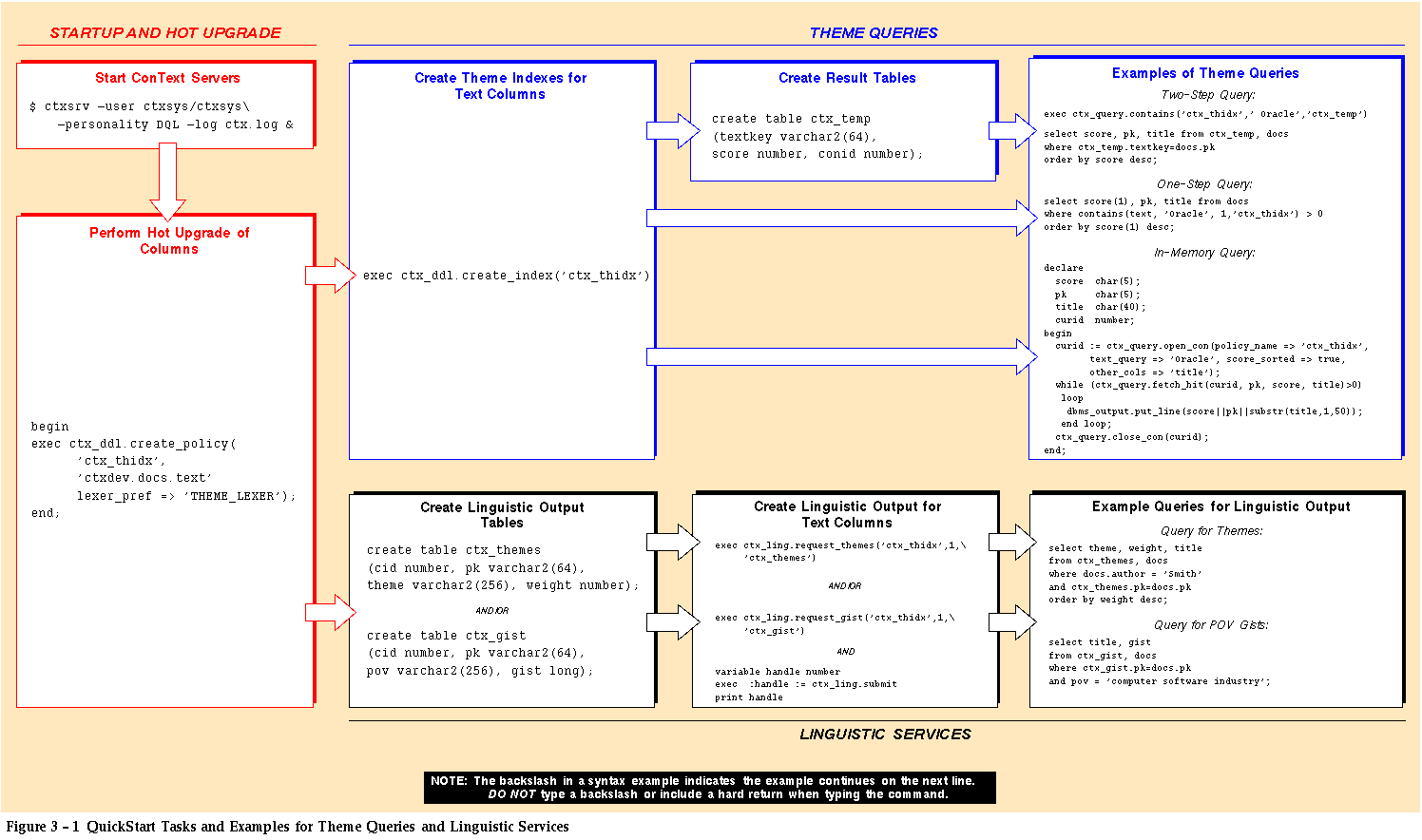
exec ctx_ddl.create_index('ctx_thidx')In this example, CREATE_INDEX is called in SQL*Plus to create a theme index for the text column (CTXDEV.DOCS.TEXT) in the CTX_THIDX policy.
After a theme index is created for a column, ConText servers with the Query personality can process theme queries for the column.
Additional Information:
Oracle ConText Option Administrator's Guide
The theme query examples in the theme query task map (Figure 3 - 1) assume that a separate result table is used for storing the results from two-step theme queries.
The three methods for performing queries are identical for both text and theme queries, with the exception that theme queries are case-sensitive.
For example, a query for the term Oracle will produce those documents in which ConText Option determined Oracle Corporation (the expansion of Oracle) to be a major topic or theme. In contrast, a text query for the term Oracle will return all documents that contain occurrences of the terms Oracle and oracle, regardless of how the term is used in the document.
For example, if the QuickStart tasks for both text and theme queries have been performed, the column CTXDEV.DOCS.TEXT will have both a text index (CTX_DOCS policy) and a theme index (CTX_THIDX policy).
The theme query task map (Figure 3 - 1) illustrates how the CTX_THIDX policy is named in a one-step query to identify the index to be searched.
Additional Information:
Oracle ConText Option Application Developer's Guide
	create table ctx_themes (cid number, pk varchar2(64),
	theme varchar2(256), weight number);
	create table ctx_gist (cid number, pk varchar2(64),
	pov varchar2(256), gist long);
In these examples, two tables (CTX_THEMES and CTX_GIST) are created in SQL*Plus for storing linguistic output. The PK column in each table stores primary keys (textkeys) for each document. The CID column in each table stores policy IDs.
Note: The output from the Linguistic Services may require modification before it can be used in an application. As such, the output tables usually serve only to temporarily store the output until the output can be modified and moved to an application table.
Additional Information:
Oracle7 Server SQL Reference,
Oracle ConText Option Application Developer's Guide
The requests in the Services Queue are picked up and processed by the first available ConText servers with the Linguistic personality.
Note: REQUEST_THEMES and REQUEST_GIST must be called once for each document for which you want to generate the respective type of linguistic output.
After linguistic output is generated, you can query for lists of themes in documents and use Gists to view summarized versions of documents.
Attention: When calling REQUEST_THEMES and REQUEST_GIST, you must specify a policy name. The specified policy can can be either a text indexing policy or a theme indexing policy; however, if you are generating both themes and Gists for a document, you should use the same policy.
For example:
exec ctx_ling.request_themes('ctx_thidx',1,'ctx_themes')
exec ctx_ling.request_gist('ctx_thidx',1,'ctx_gist')
	variable handle number
	exec :handle := ctx_ling.submit
	print handle
In this example, theme and Gist output are requested for a document with PK=1 in the text column for the CTX_THIDX theme indexing policy. The PK value corresponds to the primary key for the document. The CTX_THEMES and CTX_GISTS tables are specified as the output tables.
Then, the SUBMIT function is called. SUBMIT submits the two separate requests as a single batch request to the Services Queue and returns a handle for the request.
Note: In this example, the CTX_THIDX policy is used to call REQUEST_THEMES and REQUEST_GIST; however, you could also use the CTX_DOCS text indexing policy to generate the same results.
Additional Information:
Oracle ConText Option Application Developer's Guide
For example, you may want to display the themes for all the documents in a column or for a single document. You may also want to display the point-of-view (POV) Gist for all documents with a specific theme or the generic Gist for a specific document.
Attention: The Linguistic personality is required only for generating linguistic output for documents. Because linguistic queries are essentially structured data queries, neither the Linguistic nor the Query personalities are required for querying the linguistic output tables.
Because linguistic information is stored in tables separate from the base text table, you probably will want to join the text table and the linguistic output tables to return detailed information for the document hits.
The following examples illustrate queries for themes and Gists:
	select theme, weight, title from ctx_themes, docs,
 	where docs.author='Smith'
 	and ctx_themes.pk=docs.pk
	order by weight desc;
	select title, gist from ctx_gist, docs
	where ctx_gist.pk=docs.pk
	and pov = 'computer software industry';
In the first example, the query returns the theme, weight, and title for each document in DOCS that has Smith as the author.
In the second example, the query returns the title and POV Gist for each document that has computer software industry as one of its points-of-view (themes) in the CTX_GIST table.
Attention: ConText Option stores themes/POVs as plural nouns or noun phrases. When you perform queries using linguistic output, the query phrase must be entered exactly as it is stored in the output table or the query will likely return no results. A list of available words or phrases to query can be obtained by selecting all unique themes from the themes/Gist output table.
Additional Information:
Oracle ConText Option Application Developer's Guide
|
Prev Next |
 Copyright © 1996 Oracle Corporation. All Rights Reserved. |
Library |
Product |
Contents |