| PL/SQL User's Guide and Reference |  Library |
 Product |
 Contents |
 Index |
| PL/SQL User's Guide and Reference | Library |
Product |
Contents |
Index |


Augustine Birrell
This chapter shows you how to bundle related PL/SQL programming constructs into a package. The packaged constructs might include a collection of procedures or a pool of type definitions and variable declarations. For example, a Human Resources package might contain hiring and firing procedures. Once written, your general-purpose package is compiled, then stored in an Oracle database, where, like a library unit, its contents can be shared by many applications.
Unlike subprograms, packages cannot be called, parameterized, or nested. Still, the format of a package is similar to that of a subprogram:
CREATE PACKAGE name AS  -- specification (visible part)
   -- public type and object declarations
   -- subprogram specifications
END [name];

CREATE PACKAGE BODY name AS  -- body (hidden part)
   -- private type and object declarations
   -- subprogram bodies
[BEGIN
   -- initialization statements]
END [name];
The specification holds public declarations, which are visible to your application. The body holds implementation details and private declarations, which are hidden from your application. As Figure 8 - 1 shows, you can think of the specification as an operational interface and of the body as a "black box":
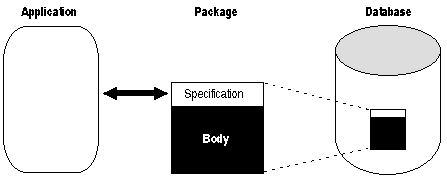 Figure 8 - 1. Package Interface
You can debug, enhance, or replace a package body without changing the interface (package specification) to the package body.
To create packages and store them permanently in an Oracle database, you use the CREATE PACKAGE and CREATE PACKAGE BODY statements, which you can execute interactively from SQL*Plus or Server Manager. For more information, see Oracle7 Server Application Developer's Guide.
In the example below, you package a record type, a cursor, and two employment procedures. Notice that the procedure hire_employee uses the database sequence empno_seq and the function SYSDATE to insert a new employee number and hire date, respectively.
CREATE PACKAGE emp_actions AS  -- specification
   TYPE EmpRecTyp IS RECORD (emp_id INTEGER, salary REAL);
   CURSOR desc_salary RETURN EmpRecTyp;
   PROCEDURE hire_employee (
      ename  VARCHAR2,
      job    VARCHAR2,
      mgr    NUMBER,
      sal    NUMBER,
      comm   NUMBER,
      deptno NUMBER);
   PROCEDURE fire_employee (emp_id NUMBER);
END emp_actions;

CREATE PACKAGE BODY emp_actions AS  -- body
   CURSOR desc_salary RETURN EmpRecTyp IS
      SELECT empno, sal FROM emp ORDER BY sal DESC;
   PROCEDURE hire_employee (
      ename  VARCHAR2,
      job    VARCHAR2,
      mgr    NUMBER,
      sal    NUMBER,
      comm   NUMBER,
      deptno NUMBER) IS
   BEGIN
      INSERT INTO emp VALUES (empno_seq.NEXTVAL, ename, job,
         mgr, SYSDATE, sal, comm, deptno);
   END hire_employee;
   PROCEDURE fire_employee (emp_id NUMBER) IS
   BEGIN
      DELETE FROM emp WHERE empno = emp_id;
   END fire_employee;
END emp_actions;
Only the declarations in the package specification are visible and accessible to applications. Implementation details in the package body are hidden and inaccessible. So, you can change the body (implementation) without having to recompile calling programs.
In addition, packages stop cascading dependencies and so avoid unnecessary recompiling. For example, if you change the definition of a standalone function, Oracle must recompile all stored subprograms that call the function. However, if you change the definition of a packaged function, Oracle need not recompile the calling subprograms because they do not depend on the package body.
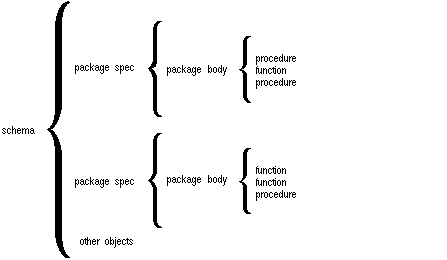 Figure 8 - 2. Package Scope
The specification lists the package resources available to applications. All the information your application needs to use the resources is in the specification. For example, the following declaration shows that the function named fac takes one argument of type INTEGER and returns a value of type INTEGER:
FUNCTION fac (n INTEGER) RETURN INTEGER; -- returns n!
That is all the information you need to call the function. You need not consider the underlying implementation of fac (whether it is iterative or recursive, for example).
Only subprograms and cursors have an underlying implementation or definition. So, if a specification declares only types, constants, variables, and exceptions, the package body is unnecessary. Consider the following bodiless package:
-- a bodiless package
CREATE PACKAGE trans_data AS
   TYPE TimeTyp IS RECORD (
      minute SMALLINT,
      hour   SMALLINT);
   TYPE TransTyp IS RECORD (
      category VARCHAR2,
      account  INTEGER,
      amount   REAL,
      time     TimeTyp);
   minimum_balance    CONSTANT REAL := 10.00;
   number_processed   INTEGER;
   insufficient_funds EXCEPTION;
END trans_data;
The package trans_data needs no body because types, constants, variables, and exceptions do not have an underlying implementation. Such packages let you define global variables--usable by subprograms and database triggers--that persist throughout a session.
package_name.type_name
package_name.object_name
package_name.subprogram_name
You can reference package contents from a database trigger, a stored subprogram, an Oracle Precompiler application, an OCI application, or an Oracle tool such as SQL*Plus. For example, you might call the packaged procedure hire_employee from SQL*Plus, as follows:
SQL> EXECUTE emp.actions.hire_employee('TATE', 'CLERK', ...);In the following example, you call the same procedure from an anonymous PL/SQL block embedded in a Pro*C program:
EXEC SQL EXECUTE
   BEGIN
      emp_actions.hire_employee(:name, :title, ...);
   END;
END-EXEC;
The actual parameters name and title are host variables.
CREATE PACKAGE random AS
   seed NUMBER;
   PROCEDURE initialize (starter IN NUMBER := seed, ...);
   ...
END random;
To match subprogram specifications and bodies, PL/SQL does a token-by-token comparison of their headers. So, except for white space, the headers must match word for word. Otherwise, PL/SQL raises an exception, as the following example shows:
CREATE PACKAGE emp_actions AS
   ...
   PROCEDURE calc_bonus (date_hired emp.hiredate%TYPE, ...);
END emp_actions;

CREATE PACKAGE BODY emp_actions AS
   ...
   PROCEDURE calc_bunus (date_hired DATE, ...) IS
      -- parameter declaration raises an exception because 'DATE'
      -- does not match 'emp.hiredate%TYPE' word for word
   BEGIN
      ...
   END calc_bonus;
END emp_actions;
The package body can also contain private declarations, which define types and objects necessary for the internal workings of the package. The scope of these declarations is local to the package body. Therefore, the declared types and objects are inaccessible except from within the package body. Unlike a package specification, the declarative part of a package body can contain subprogram bodies.
Following the declarative part of a package body is the optional initialization part, which typically holds statements that initialize some of the variables previously declared in the package.
The initialization part of a package plays a minor role because, unlike subprograms, a package cannot be called or passed parameters. As a result, the initialization part of a package is run only once, the first time you reference the package.
Recall that if a specification declares only types, constants, variables, and exceptions, the package body is unnecessary. However, the body can still be used to initialize objects declared in the specification.
CREATE PACKAGE emp_actions AS
   /* Declare externally visible types, cursor, exception. */
   TYPE EmpRecTyp IS RECORD (emp_id INTEGER, salary REAL);
   TYPE DeptRecTyp IS RECORD (dept_id INTEGER, location VARCHAR2);
   CURSOR desc_salary RETURN EmpRecTyp;
   salary_missing EXCEPTION;

   /* Declare externally callable subprograms. */
   FUNCTION hire_employee (
      ename  VARCHAR2,
      job    VARCHAR2,
      mgr    NUMBER,
      sal    NUMBER,
      comm   NUMBER,
      deptno NUMBER) RETURN INTEGER;
   PROCEDURE fire_employee (emp_id INTEGER);
   PROCEDURE raise_salary (emp_id INTEGER, increase NUMBER);
   FUNCTION nth_highest_salary (n INTEGER) RETURN EmpRecTyp;
END emp_actions;

CREATE PACKAGE BODY emp_actions AS
   number_hired  INTEGER;  -- visible only in this package

   /* Fully define cursor specified in package. */
   CURSOR desc_salary RETURN EmpRecTyp IS
      SELECT empno, sal FROM emp ORDER BY sal DESC;

   /* Fully define subprograms specified in package. */
   FUNCTION hire_employee (
      ename  VARCHAR2,
      job    VARCHAR2,
      mgr    NUMBER,
      sal    NUMBER,
      comm   NUMBER,
      deptno NUMBER) RETURN INTEGER IS
      new_empno  INTEGER;
   BEGIN
      SELECT empno_seq.NEXTVAL INTO new_empno FROM dual;
      INSERT INTO emp VALUES (new_empno, ename, job,
         mgr, SYSDATE, sal, comm, deptno);
      number_hired := number_hired + 1;
      RETURN new_empno;
   END hire_employee;

   PROCEDURE fire_employee (emp_id INTEGER) IS
   BEGIN
      DELETE FROM emp WHERE empno = emp_id;
   END fire_employee;

   PROCEDURE raise_salary (emp_id INTEGER, increase NUMBER) IS
      current_salary NUMBER;
   BEGIN
      SELECT sal INTO current_salary FROM emp
         WHERE empno = emp_id;
      IF current_salary IS NULL THEN
         RAISE salary_missing;
      ELSE
         UPDATE emp SET sal = sal + increase
            WHERE empno = emp_id;
      END IF;
   END raise_salary;

   FUNCTION nth_highest_salary (n INTEGER) RETURN EmpRecTyp IS
      emp_rec  EmpRecTyp;
   BEGIN
      OPEN desc_salary;
      FOR i IN 1..n LOOP
         FETCH desc_salary INTO emp_rec;
      END LOOP;
      CLOSE desc_salary;
      RETURN emp_rec;
   END nth_highest_salary;

   /* Define local function, available only in package. */
   FUNCTION rank (emp_id INTEGER, job_title VARCHAR2)
      RETURN INTEGER IS
   /* Return rank (highest = 1) of employee in a given
      job classification based on performance rating. */
      head_count INTEGER;
      score      NUMBER;
   BEGIN
      SELECT COUNT(*) INTO head_count FROM emp
         WHERE job = job_title;
      SELECT rating INTO score FROM reviews
         WHERE empno = emp_id;
      score := score / 100;  -- maximum score is 100
      RETURN (head_count + 1) - ROUND(head_count * score);
   END rank;

BEGIN  -- initialization part starts here
   INSERT INTO emp_audit VALUES (SYSDATE, USER, 'EMP_ACTIONS');
   number_hired := 0;
END emp_actions;
Remember, the initialization part of a package is run just once, the first time you reference the package. So, in the last example, only one row is inserted into the database table emp_audit. Likewise, the variable number_hired is initialized only once.
Every time the procedure hire_employee is called, the variable number_hired is updated. However, the count kept by number_hired is session specific. That is, the count reflects the number of new employees processed by one user, not the number processed by all users.
In the next example, you package some typical bank transactions. Assume that debit and credit transactions are entered after business hours via automatic teller machines, then applied to accounts the next morning.
CREATE PACKAGE bank_transactions AS
   /* Declare externally visible constant. */
   minimum_balance  CONSTANT NUMBER := 100.00;

   /* Declare externally callable procedures. */
   PROCEDURE apply_transactions;
   PROCEDURE enter_transaction (
      acct   NUMBER,
      kind   CHAR,
      amount NUMBER);
END bank_transactions;

CREATE PACKAGE BODY bank_transactions AS
   /* Declare global variable to hold transaction status. */
   new_status  VARCHAR2(70) := 'Unknown';

   /* Use forward declarations because apply_transactions
      calls credit_account and debit_account, which are not
      yet declared when the calls are made. */
   PROCEDURE credit_account (acct NUMBER, credit REAL);
   PROCEDURE debit_account (acct NUMBER, debit REAL);
   /* Fully define procedures specified in package. */
   PROCEDURE apply_transactions IS
   /* Apply pending transactions in transactions table
      to accounts table. Use cursor to fetch rows. */
      CURSOR trans_cursor IS
         SELECT acct_id, kind, amount FROM transactions
            WHERE status = 'Pending'
            ORDER BY time_tag
            FOR UPDATE OF status;  -- to lock rows
   BEGIN
      FOR trans IN trans_cursor LOOP
         IF trans.kind = 'D' THEN
            debit_account(trans.acct_id, trans.amount);
         ELSIF trans.kind = 'C' THEN
            credit_account(trans.acct_id, trans.amount);
         ELSE
            new_status := 'Rejected';
         END IF;
         UPDATE transactions SET status = new_status
            WHERE CURRENT OF trans_cursor;
      END LOOP;
   END apply_transactions;

   PROCEDURE enter_transaction (
   /* Add a transaction to transactions table. */
      acct   NUMBER,
      kind   CHAR,
      amount NUMBER) IS
   BEGIN
      INSERT INTO transactions
         VALUES (acct, kind, amount, 'Pending', SYSDATE);
   END enter_transaction;

   /* Define local procedures, available only in package. */
   PROCEDURE do_journal_entry (
   /* Record transaction in journal. */
      acct    NUMBER,
      kind    CHAR,
      new_bal NUMBER) IS
   BEGIN
      INSERT INTO journal
         VALUES (acct, kind, new_bal, sysdate);
      IF kind = 'D' THEN
         new_status := 'Debit applied';
      ELSE
         new_status := 'Credit applied';
      END IF;
   END do_journal_entry;
   PROCEDURE credit_account (acct NUMBER, credit REAL) IS
   /* Credit account unless account number is bad. */
      old_balance NUMBER;
      new_balance NUMBER;
   BEGIN
      SELECT balance INTO old_balance FROM accounts
         WHERE acct_id = acct
         FOR UPDATE OF balance;  -- to lock the row
      new_balance := old_balance + credit;
      UPDATE accounts SET balance = new_balance
         WHERE acct_id = acct;
      do_journal_entry(acct, 'C', new_balance);
   EXCEPTION
      WHEN NO_DATA_FOUND THEN
         new_status := 'Bad account number';
      WHEN OTHERS THEN
         new_status := SUBSTR(SQLERRM,1,70);
   END credit_account;

   PROCEDURE debit_account (acct NUMBER, debit REAL) IS
   /* Debit account unless account number is bad or
      account has insufficient funds. */
      old_balance        NUMBER;
      new_balance        NUMBER;
      insufficient_funds EXCEPTION;
   BEGIN
      SELECT balance INTO old_balance FROM accounts
         WHERE acct_id = acct
         FOR UPDATE OF balance;  -- to lock the row
      new_balance := old_balance - debit;
      IF new_balance >= minimum_balance THEN
         UPDATE accounts SET balance = new_balance
            WHERE acct_id = acct;
         do_journal_entry(acct, 'D', new_balance);
      ELSE
         RAISE insufficient_funds;
      END IF;
   EXCEPTION
      WHEN NO_DATA_FOUND THEN
         new_status := 'Bad account number';
      WHEN insufficient_funds THEN
         new_status := 'Insufficient funds';
      WHEN OTHERS THEN
         new_status := SUBSTR(SQLERRM,1,70);
   END debit_account;
END bank_transactions;
In this package, the initialization part is not used.
However, items declared in the specification of emp_actions such as the exception salary_missing are visible outside the package. Therefore, any PL/SQL code can reference the exception salary_missing. Such items are termed public.
When you must maintain items throughout a session or across transactions, place them in the declarative part of the package body. For example, the value of number_hired is retained between calls to hire_employee. Remember, however, that the value of number_hired is session specific.
If you must also make the items public, place them in the package specification. For example, the constant minimum_balance declared in the specification of the package bank_transactions is available for general use.
Note: When you call a packaged subprogram remotely, the whole package is reinstantiated and its previous state is lost.
CREATE PACKAGE journal_entries AS
   PROCEDURE journalize (amount NUMBER, trans_date VARCHAR2);
   PROCEDURE journalize (amount NUMBER, trans_date NUMBER );
END journal_entries;

CREATE PACKAGE BODY journal_entries AS
   PROCEDURE journalize (amount NUMBER, trans_date VARCHAR2) IS
   BEGIN
      INSERT INTO journal
         VALUES (amount, TO_DATE(trans_date, 'DD-MON-YYYY'));
   END journalize;
   PROCEDURE journalize (amount NUMBER, trans_date NUMBER) IS
   BEGIN
      INSERT INTO journal
         VALUES (amount, TO_DATE(trans_date, 'J'));
   END journalize;
END journal_entries;
The first procedure accepts trans_date as a character string, while the second procedure accepts it as a number (the Julian day). Yet, each procedure handles the data appropriately.
FUNCTION ABS (n NUMBER) RETURN NUMBER;
The contents of package STANDARD are directly visible to applications. So, you can call ABS from a database trigger, a stored subprogram, an Oracle Precompiler application, an OCI application, and various Oracle tools including Oracle Forms, Oracle Reports, and SQL*Plus.
If you redeclare ABS in a PL/SQL program, your local declaration overrides the global declaration. However, you can still call the built-in function by using dot notation, as follows:
... STANDARD.ABS(x) ...
Most built-in functions are overloaded. For example, package STANDARD contains the following declarations:
FUNCTION TO_CHAR (right DATE) RETURN VARCHAR2;
FUNCTION TO_CHAR (left NUMBER) RETURN VARCHAR2;
FUNCTION TO_CHAR (left DATE, right VARCHAR2) RETURN VARCHAR2;
FUNCTION TO_CHAR (left NUMBER, right VARCHAR2) RETURN VARCHAR2;
PL/SQL resolves a call to TO_CHAR by matching the number and datatypes of the formal and actual parameters.
![[*]](jump.gif) .
.
.
.
At the other end of the pipe, you can use the procedures receive_message and unpack_message to receive and unpack (read) the message. Named pipes are useful in many ways. For example, you can write routines in C that allow external servers to collect information, then send it through pipes to procedures stored in an Oracle database.
When you want to read or write a text file, you call the function fopen, which returns a file handle for use in subsequent procedure calls. For example, the procedure put_line writes a text string and line terminator to an open file. The procedure get_line reads a line of text from an open file into an output buffer.
PL/SQL file I/O is available on both the client and server sides. However, on the server side, file access is restricted to those directories explicitly listed in the accessible directories list, which is stored in the Oracle initialization file.
Package specifications reflect the design of your application. So, define them before the package bodies. Place in a specification only the types, objects, and subprograms that must be visible to users of the package. That way, other developers cannot misuse the package by basing their code on irrelevant implementation details.
To reduce the need for recompiling when code is changed, place as few items as possible in a package specification. Changes to a package body do not require Oracle to recompile dependent procedures. However, changes to a package specification require Oracle to recompile every stored subprogram that references the package.
|
Prev Next |
 Copyright © 1996 Oracle Corporation. All Rights Reserved. |
Library |
Product |
Contents |
Index |